As a business owner, you’re constantly evaluating investments. Every dollar spent must work for you, not just sit there. When it comes to a new or improved website, it’s easy to get caught up in the numbers—the initial quote, the hosting fees, the plugin costs. But what if we shifted our perspective? What if we stopped seeing a website as a line item and started seeing it for what it truly is: a powerful, revenue-generating machine?
The cost of a website isn’t an expense; it’s a strategic investment in your business’s future. It’s the difference between hoping customers find you and actively guiding them toward a sale. It’s the silent salesperson working 24/7, and the most effective marketing tool you’ll ever own.
Here’s a breakdown of the key elements that contribute to your website’s value, turning a simple price tag into a powerful ROI.
Custom Theme vs. Rebuilt Template
This is one of the first and most critical decisions you’ll face. While a pre-built template might seem like a cost-effective shortcut, it can quickly become a ceiling on your potential. Templates are designed for a broad audience, not for your specific business. A custom-built theme, on the other hand, is a bespoke suit for your brand. It’s designed from the ground up to support your unique business processes, brand identity, and customer journey. This translates directly into a more fluid user experience, higher conversion rates, and a professional image that builds trust and authority. You’re not just getting a website; you’re getting a tool built for your success.
API Integrations: The Digital Nervous System
Think of your website as a body, and APIs (Application Programming Interfaces) as the nervous system that allows it to communicate with other essential parts of your business. Connecting your website to your existing CRM, accounting software, or email marketing platform isn’t just a convenience—it’s a massive efficiency boost. When you automate data transfer, you free up your team from tedious manual work, allowing them to focus on high-value tasks. This streamlined workflow not only saves you money but also reduces errors and provides a seamless experience for your customers, from initial inquiry to final purchase.
Content is Your Fuel
A website with great design but no content is like a high-performance car with an empty gas tank. The cost of content creation—whether it’s writing compelling copy, shooting professional photography, or producing engaging videos—is a direct investment in your SEO and customer engagement. High-quality content improves your search engine rankings, bringing more qualified leads to your digital doorstep. It also educates, inspires, and builds trust with your audience, positioning you as an industry leader and turning casual visitors into loyal clients.
Ongoing SEO: The Long Game
Your website’s launch is a major milestone, but it’s just the beginning. Without ongoing Search Engine Optimization (SEO) services, your website will be like a billboard in the middle of a desert—it looks great, but no one is there to see it. Continuous SEO work, including keyword research, content optimization, and technical audits, ensures your site remains visible and competitive in search results. This isn’t a one-time fee; it’s a recurring investment that pays dividends by consistently driving organic, high-intent traffic to your business, lowering your customer acquisition costs over time.
Customizing Plug-ins & E-commerce
Every business has unique needs, and standard functionality doesn’t always cut it. Customizing a plug-in or adding e-commerce functionality goes beyond a simple transaction; it’s about building a digital storefront that works exactly as you need it to. From a tailored checkout process to a personalized product recommendation engine, these customizations can dramatically increase your average order value and improve customer satisfaction. It’s the difference between a generic online shop and a captivating, brand-specific retail experience.
A Cautionary Tale
I once worked with a client who insisted on cutting corners. They found a cheap, pre-built template and refused to invest in any custom integrations, claiming they could “do it manually.” While they saved a few hundred dollars on the initial build, they were stuck with a website that couldn’t communicate with their existing software. Every day, their staff spent hours manually transferring customer data, leading to costly errors, frustrated employees, and lost sales. The initial “savings” were quickly swallowed by the ongoing operational inefficiencies, and they ultimately had to rebuild the site from scratch.
This story serves as a powerful reminder: the true cost of a website is not its price tag, but the opportunities you lose by not making the right investment. Investing in a professional, strategic website isn’t about spending money; it’s about making a commitment to your business’s growth and profitability. It’s about building a foundation that will not only boost your revenue today but also secure your success for years to come.
Blog
-

The WordPress Website as a Revenue Engine: Beyond the Price Tag
-
WordPress: A Versatile Ally for Any Business
In the ever-evolving digital landscape, businesses seek robust and adaptable platforms to establish their online presence. Enter WordPress—a powerhouse that transcends mere website creation. Whether you’re a startup finding your footing or an established enterprise aiming to innovate, WordPress stands as a versatile ally, ready to amplify your business potential. Let’s delve into how this dynamic platform can transform your brand and drive success.
Unlocking Business Potential with WordPress Flexibility
WordPress offers unparalleled flexibility, allowing businesses to tailor their websites to specific needs without extensive coding knowledge. With a vast library of themes and plugins, companies can customize their online presence to reflect their unique identity and cater to their target audience. This adaptability ensures that as your business grows and evolves, your website can seamlessly scale alongside it, accommodating new features and functionalities as needed.
Moreover, WordPress is built with user-friendliness in mind, enabling teams to manage and update content effortlessly. From adding new products to publishing blog posts, the intuitive interface empowers non-technical users to take control of their digital storefront. This ease of use minimizes downtime and accelerates the process of getting your business online, ensuring you stay ahead in a competitive market.
Security and performance are also paramount with WordPress. Regular updates and a strong community focus on enhancing the platform mean that your website remains secure against threats and optimized for speed. By leveraging these built-in advantages, businesses can provide a reliable and efficient user experience, fostering trust and loyalty among customers.
Empowering Your Brand: WordPress Solutions That Shine
WordPress is more than just a website builder; it’s a comprehensive ecosystem that supports various aspects of brand development. From SEO optimization tools that enhance your visibility on search engines to e-commerce integrations that streamline your online sales, WordPress equips your brand with the resources needed to thrive in the digital marketplace. These solutions are designed to work harmoniously, creating a cohesive and powerful online presence.
Visual storytelling is another area where WordPress excels, offering a plethora of design options that allow your brand’s personality to shine through. High-quality themes and customizable layouts enable you to craft aesthetically pleasing websites that resonate with your audience. Additionally, multimedia support ensures that your content—be it images, videos, or interactive elements—engages visitors and keeps them coming back for more.
Community and support are integral to the WordPress experience. With a global network of developers, designers, and users, you have access to endless resources and collaborative opportunities. Whether you’re troubleshooting an issue or seeking inspiration for your next project, the WordPress community stands ready to support your brand’s journey, ensuring that your business not only competes but excels in the digital realm.
Embracing WordPress as your business’s digital foundation means partnering with a platform that grows with you. Its unmatched flexibility and comprehensive solutions empower brands to create, innovate, and excel in an increasingly competitive world. As you navigate the complexities of the online marketplace, let WordPress be the steadfast ally that transforms your vision into reality, unlocking endless possibilities for your business’s future.
-
The Future of WordPress: Trends and Technologies to Watch
WordPress, the ubiquitous content management system (CMS) powering over 43% of all websites, is far from stagnant. While its core principles of user-friendliness and extensibility remain, the platform is constantly evolving to meet the demands of a rapidly changing digital landscape. From the rise of AI to the shift towards headless architectures, the future of WordPress is being shaped by a confluence of exciting trends and powerful technologies. Understanding these developments is crucial for developers, businesses, and anyone relying on WordPress to maintain a competitive edge. This article will delve into the key factors influencing WordPress’s trajectory, providing insights into what the future holds for this dominant platform.
Emerging Trends Shaping WordPress’s Evolution
The evolution of WordPress is driven by several key trends, reflecting broader shifts in web development and user expectations. One of the most significant is the continued emphasis on user experience (UX). This goes beyond simple aesthetics; it encompasses site speed, accessibility, and intuitive navigation. Google’s Core Web Vitals, which measure page loading speed, interactivity, and visual stability, have become critical ranking factors, forcing WordPress developers and site owners to prioritize performance optimization. Themes and plugins are increasingly designed with these metrics in mind, and tools like Google PageSpeed Insights are becoming indispensable for WordPress management.
Another crucial trend is the rise of no-code/low-code development. While WordPress has always been relatively user-friendly, the demand for even simpler website creation and customization is growing. Page builders like Elementor, Beaver Builder, and the native Gutenberg editor are constantly evolving to provide more drag-and-drop functionality, pre-built templates, and intuitive design controls. This empowers non-developers to create and manage sophisticated websites without needing to write extensive code, democratizing web development and allowing businesses to iterate faster.
The growing importance of accessibility is also shaping WordPress’s future. Websites need to be usable by everyone, regardless of disability. This includes considerations for users with visual impairments, motor limitations, cognitive disabilities, and more. The WordPress Accessibility Team is actively working to improve the platform’s core accessibility, and developers are increasingly focusing on creating themes and plugins that adhere to WCAG (Web Content Accessibility Guidelines) standards. This is not only ethically important but also legally mandated in many jurisdictions, making accessibility a non-negotiable aspect of modern WordPress development.
Finally, e-commerce integration continues to be a major trend. WordPress, through plugins like WooCommerce, has become a dominant force in online retail. WooCommerce itself is constantly evolving, adding features like improved inventory management, multi-channel selling capabilities, and enhanced payment gateway integrations. The rise of subscription-based business models and the increasing demand for personalized shopping experiences are also driving innovation in WordPress e-commerce solutions. According to BuiltWith, WooCommerce powers over 28% of all online stores, highlighting its significant presence in the e-commerce landscape.
Key Technologies Driving WordPress Innovation
Several core technologies are underpinning the advancements in WordPress, enabling new features and functionalities. One of the most important is JavaScript frameworks, particularly React. The Gutenberg editor itself is built on React, and this trend is extending to other areas of WordPress development. React allows for the creation of dynamic and interactive user interfaces, improving the editing experience and enabling more sophisticated front-end features. This shift towards JavaScript-heavy development requires WordPress developers to adapt and acquire new skills.
PHP, the server-side scripting language at the heart of WordPress, continues to evolve. Newer versions of PHP offer significant performance improvements and enhanced security features. Staying up-to-date with the latest PHP versions is crucial for maintaining a fast, secure, and efficient WordPress website. The WordPress core team actively encourages users to upgrade to supported PHP versions, and hosting providers are increasingly phasing out support for older, less secure versions.
APIs (Application Programming Interfaces) are also playing a crucial role in WordPress innovation. The WordPress REST API allows developers to interact with WordPress data from external applications, enabling the creation of custom integrations, mobile apps, and headless WordPress setups. This opens up a world of possibilities for extending WordPress beyond its traditional role as a monolithic CMS. The REST API is a cornerstone of the headless WordPress movement, which we’ll explore in more detail later.
Finally, cloud hosting is becoming increasingly prevalent in the WordPress ecosystem. Cloud platforms like Amazon Web Services (AWS), Google Cloud Platform (GCP), and Microsoft Azure offer scalability, reliability, and performance benefits that traditional hosting solutions often struggle to match. Managed WordPress hosting providers are leveraging these cloud platforms to provide optimized hosting environments specifically tailored for WordPress, simplifying deployment and management for users. This trend towards cloud hosting is driven by the need for greater flexibility and resilience in the face of fluctuating traffic and evolving website demands.
The Impact of AI and Machine Learning on WordPress
Artificial intelligence (AI) and machine learning (ML) are poised to revolutionize many aspects of WordPress, from content creation to security. One of the most immediate applications is in content generation and optimization. AI-powered tools can assist with writing blog posts, generating product descriptions, creating social media updates, and even optimizing existing content for search engines. These tools can analyze text for readability, keyword density, and SEO best practices, helping users create more engaging and effective content.
AI is also transforming website security. Machine learning algorithms can be used to detect and prevent malicious attacks, such as brute-force login attempts, SQL injection, and cross-site scripting (XSS). AI-powered security plugins can analyze website traffic in real-time, identify suspicious patterns, and automatically block malicious actors. This proactive approach to security is becoming increasingly important as cyber threats become more sophisticated.
Personalization is another area where AI is making a significant impact. AI-powered plugins can analyze user behavior, preferences, and demographics to deliver personalized content, product recommendations, and user experiences. This can lead to increased engagement, higher conversion rates, and improved customer satisfaction. For example, an e-commerce site could use AI to recommend products based on a user’s past purchases or browsing history.
Finally, AI is being used to improve website accessibility. AI-powered tools can automatically generate alt text for images, transcribe audio and video content, and even adapt website layouts to better suit users with specific disabilities. This helps to make websites more inclusive and accessible to a wider audience, aligning with the growing emphasis on web accessibility standards. While the full potential of AI in WordPress is still being explored, it’s clear that it will play a major role in shaping the platform’s future.
WordPress in the Era of Headless and Composable Architectures
The traditional WordPress architecture, where the front-end (what users see) and back-end (where content is managed) are tightly coupled, is being challenged by the rise of headless and composable architectures. Headless WordPress separates the content repository (WordPress) from the presentation layer (the front-end). This means that WordPress is used solely as a content management system, and the front-end is built using a separate technology, such as React, Vue.js, or Next.js. The WordPress REST API, or increasingly GraphQL, is used to fetch content from WordPress and display it on the front-end.
This decoupling offers several advantages. It allows for greater flexibility and customization of the front-end, enabling developers to create unique and highly performant user experiences. It also improves scalability and performance, as the front-end can be optimized independently of the WordPress back-end. Furthermore, it enhances security by reducing the attack surface, as the WordPress installation is not directly exposed to the public.
Composable architectures take this concept a step further. Instead of relying on a single monolithic CMS, a composable architecture combines multiple best-of-breed services, each handling a specific function. For example, WordPress might be used for content management, while a separate service handles e-commerce, another handles search, and another handles user authentication. These services are connected via APIs, creating a highly flexible and scalable system.
The shift towards headless and composable architectures represents a significant paradigm shift for WordPress. It requires developers to acquire new skills in front-end frameworks and API integration. However, it also opens up new possibilities for creating innovative and highly performant web experiences. While traditional WordPress will continue to be a viable option for many users, headless and composable architectures are likely to become increasingly popular for larger, more complex projects, and for businesses seeking greater control and flexibility over their digital presence. Companies like WP Engine and Pantheon are already offering specialized hosting and tooling to support headless WordPress deployments, indicating the growing market demand for this approach.
The future of WordPress is dynamic and multifaceted. Driven by evolving user expectations, emerging technologies, and a vibrant community, WordPress is adapting to remain a relevant and powerful platform for years to come. From the continued emphasis on user experience and accessibility to the transformative potential of AI and the rise of headless architectures, the trends and technologies discussed in this article are shaping a new era for WordPress. Embracing these changes, acquiring new skills, and staying informed about the latest developments will be crucial for anyone involved in the WordPress ecosystem to thrive in this exciting future.
-
The Future of Web Development: Trends to Watch in 2024
Web development is a dynamic landscape that is continually reshaped by new technologies, evolving user needs, and innovative design philosophies. As we look towards 2024, understanding the trends that will dominate the industry is vital for businesses seeking to maintain a competitive edge. From the rise of artificial intelligence to the increasing importance of user experience (UX) design, this post will explore the key trends likely to redefine web development in the coming year.
1. The Rise of Artificial Intelligence (AI)
Artificial intelligence has begun to play a pivotal role in web development, and its influence is set to grow in 2024. AI tools are enabling developers to streamline the design process, enhance personalization, and improve customer service. For instance, chatbots powered by AI can provide instant support to users, increasing engagement and satisfaction.
Moreover, AI-driven analytics tools can help businesses gain deeper insights into user behavior, allowing for data-informed decisions that can enhance the overall user experience. Are you considering integrating AI into your website strategy? What aspects do you believe would benefit most from AI capabilities?2. Increased Focus on User Experience (UX) Design
In 2024, user experience design will take center stage as businesses recognize the importance of creating engaging, accessible, and user-friendly websites. Research shows that poor UX can significantly affect conversion rates — a user-focused design can increase customer loyalty and drive sales.
Incorporating immersive technologies such as augmented reality (AR) and virtual reality (VR) into UX design can also play a major role in capturing customer interest. These tools provide an interactive experience that can differentiate a brand in a competitive market. How has your business prioritized UX in its web development projects, and what improvements do you see on the horizon?
3. No-Code and Low-Code Development Solutions
As organizations strive to accelerate their digital transformation, no-code and low-code development platforms are becoming increasingly popular. These tools empower users — even those without extensive programming knowledge — to create and manage their own websites and applications.
The advantages of no-code solutions include faster development timelines, reduced costs, and increased collaboration across teams. In 2024, we anticipate that these platforms will further democratize web development and make it accessible to a wider audience. How could no-code tools benefit your organization or streamline your workflow?
4. Dark Mode and Accessibility Considerations
As user preferences evolve, the demand for dark mode options is on the rise. Many users appreciate the aesthetic appeal and reduced eye strain of dark mode interfaces. In response, web developers need to ensure that their sites are equipped to handle both light and dark modes effectively.
Furthermore, accessibility remains a critical consideration in web development. Ensuring that websites comply with the Web Content Accessibility Guidelines (WCAG) is not just a best practice; it’s a necessity. In 2024, we expect to see an increasing focus on inclusivity and accessibility, with businesses recognizing the importance of reaching all users, regardless of their abilities. Is your site fully accessible? What changes can you make today to enhance accessibility for all users?
5. Emphasis on Security and Data Privacy
As online threats and data breaches become more sophisticated, the emphasis on security and data privacy is set to rise in 2024. Developers must prioritize robust security measures during the development process, including SSL certificate implementation, data encryption, and secure authentication protocols.
In addition, with regulations like the GDPR and CCPA shaping the landscape of data privacy, businesses must stay informed about legal requirements and best practices. What steps is your organization taking to ensure compliance and protect customer data?
Conclusion
The web development landscape is evolving at an unprecedented pace, and staying ahead of the trends is essential for anyone looking to thrive in the digital era. By embracing innovations like AI, focusing on user experience, utilizing no-code development solutions, prioritizing accessibility, and enhancing security measures, businesses can position themselves for success in 2024.What trends do you believe will have the most significant impact on web development in the coming year? We invite you to share your thoughts in the comments below, and if you’re looking for expert guidance on how to implement these trends effectively, feel free to contact us for a consultation. Together, let’s build a brighter digital future!
-
Want To Learn More About WordPress? We Can Help!

Creating a blog to express yourself and your ideas is a great thing. For that reason, WordPress is an incredibly popular option for bloggers of all descriptions. This article is full of great tips and tricks to help make WordPress as useful as possible.
Don’t choose a design that’s identical to what others that have a WordPress website use. This may be tempting since it’s a time saver, but users will not be too impressed with your effort. You should have a site that showcases your individual business.
TIP! Use different designs than other blogs on WordPress. Though it is less time consuming, your site will blend in with other blogs.If you have a long title on a post, be sure to clean up your permalink. For instance: “Ways Parent Can Control Their kids” is too long. Choose something simpler like “intelligent-parents-manage-children“.
Devote some time to learning about the various options and tools that you have at your fingertips when you use WordPress for blogging. For example, clicking the Kitchen Sink will give you choices such as importing and formatting posts. Use this section to change many of your formatting elements.
TIP! Make sure you’re taking time to get familiar with the tools and other options you can use when you do some WordPress blogging. For example, clicking on KITCHEN SINK gives you many more choices in formatting and importing that set your posts apart.It is simple to add video to a site created with WordPress. Although you may have to put in a little more time, you will get rewarded for your effort in the end. The majority of people that use the internet are extremely visual. Videos can teach people much better than words can.
Educate yourself on WordPress before you get started. Increased planning leads to a better executed blog. Learn what you can about SEO, or search engine optimization, and find out how to create engaging content for visitors. Learn how you can use WordPress to the highest advantage. That will help make sure that you don’t have a tough time when you start.
TIP! Use Alt and Title tags. This adds searchable text to the posts.You may invest lots of time editing your WordPress site only to get the idea that none of it was saved. This most likely is not true. See if clearing the browser’s cache resolves the issue. You should see the changes by pressing shift and refreshing the browser.
Improve your position in the SERPs by spending time posting your pictures correctly. Always add in title and alternate text tags. This works in all kinds of places, including the very popular Pinterest.
TIP! Video blogging is a snap with WordPress. This will require you to make special preparations, but it will be worth the effort.Organize that media library often. Uploading images without thinking of organization can cause havoc to your site. You should start with a simple folder structure and go from there. Later, you will be able to find an image you want to use much easier.
Be certain that your plugins are always up to date. The plugins are what makes WordPress so great. But like any other software, it is important to update it. You must be sure to install updates so that you don’t miss important upgrades. Additionally, sometimes plugins stop working if they are not updated regularly.
TIP! Learn what you can before installing WordPress. The more you’re able to do in advance, the more you’ll be better prepared when you start.Make sure you have just the minimum number of WordPress plugins you need. When you add too many plugins, it can slow your website down. This means that the site will run slower for both you and your readers, and worse, it can make an negative impact on your search engine ranking. Websites that run slow get ranked lower by search engines compared to websites optimized for speed.
Blogging has gained popularity all across the world. It’s an incredible feeling to have your thoughts reach people across the globe. After having read the tips described, you can now do that using WordPress.
TIP! Create a schedule for posting. By developing a schedule, you will remain motivated. -
Top Tips Regarding WordPress You’ll Love To Learn

Do you know how to set up and use WordPress? Do you know about the top plugins and how to use them? Do security concerns bother you? Understanding this information will help you develop a site that people will want to visit time and time again. Continue reading to find answers to the questions you have with regard to WordPress.
A clean permalink will make it easier to post blogs with long titles. For instance, a title such as “Top Ten Way To Tame Unruly Children” can create a long URL. Instead, you could use something like: “Smart Parents Control Kids” if it works with your SEO strategy.
WordPress is something that people can use to get video blogs onto their sites. The time spent in preparation is time well spent. Internet users are mainly visual. Videos offer perspectives that written content cannot, so they are quite helpful.
TIP! Be certain your WordPress design is different from other ones. You may be tempted to choose from the first couple of pages, but if you do, your blog will be very commonplace.Make sure you learn everything you can prior to installing WordPress. The more prepared you are, the simpler the process of setting up your page will be. Learn about SEO, creating effective content, and using WordPress and its many features to help ease your workflow.
If you’re serious about keeping up with your blog, make a posting schedule for yourself. If you are aware of when you ought to post, your motivation will stay high. You can actually make all of your posts for a week in one day. You can then schedule it so WordPress will upload some of these posts at a later date.
Delete comments or content that add no value to your site. Your visitors will appreciate your efforts. To get rid of spam on a daily basis, Akismet can be a useful plugin.
TIP! Clean up long post titles as you construct the permalink. Something like, “The Top 5 Ways Parents Discipline their Children” is a little too lengthy.When you take time to adjust a WordPress blog, you may not realize that your changes weren’t saved at all. This is likely not the case. To remedy this, try clearing your browser’s cache. Hold down the Shift key as you click Refresh to see the changes to your site.
You must make adjustments if you do not want your posts to show up in the order published. You must alter the date if you wish to reorder the list. In order to do that, open one of your posts and you will be able to see the date at the top right hand corner. Changing the date and saving it will re-position it.
You should understand WordPress better after reading this information. The more you know, the more skilled you will become. These ideas give you a great starting point. Use this page if you ever get into trouble.
TIP! Video blogging is a snap with WordPress. While you may need to prepare a little more, that makes things worth it. -
WordPress Tips, Tricks, And Advice Straight From The Experts

Many people have praised WordPress and considered it an intuitive blogging platform. However, it does require some knowledge to use WordPress successfully. Keep reading to find out how you don’t have to be one of them.
Use Alt and Title when you are using WordPress. You should include alt text when adding images to your posts. Such areas provide a chance to add additional SEO phrases, and they show viewers who have not enabled images to see what they are missing.
TIP! Choose a design that is relatively unique when making your WordPress blog; don’t just choose the design everyone else is using. While copying someone else’s design is quick, it doesn’t make a good impression.Make sure that your content is free of fluff. This keeps your site clean and easier to use. Akismet is a great plugin that you can include that will help you to filter out the daily spam on your site.
Sometimes you might think some changes you’ve made weren’t saved. It is probably not the truth. Try solving this problem by clearing the browser cache. Press and keep holding the Shift key as you refresh your browser, and you should then see your changes.
TIP! If your post has a long title, clean up its permalink. For instance: “Ways Parent Can Control Their kids” is too long.Work on creating a better greeting for the top of your WordPress website. This can make things more personal with your visitors, as you can create a message that relates to how the user found your blog. A possible plugin to use is WP Greet Box; using this will make the things feel less robotic.
Security is crucial for a site built with WordPress, so always keep your passwords secure. Also, only use plugins from sites of good repute. If your site is hacked or attacked with malware, you could lose the whole thing.
TIP! Make sure to use both alt text and title tags. text when you upload images.Use descriptions that are very targeted. These are a few of the things your readership will see first when using search engines. Don’t overlook the importance of this fact. If you want more control, try using the SEO program, Scribe. You can easily edit, change and remove items from your webpage.
Organize that media library often. You may wish to just put images right into your library, but this can result in chaos. Create a folder structure when you begin and place images into the folders properly. Just this simple move will make it much simpler to find (and use) photos in the future.
TIP! Make a schedule for posting to your blog. You will feel motivated to post regularly if you have a good schedule.With just a little bit of instruction, nearly anyone can be successful with WordPress. That’s why it has such a great reputation. Follow the tips presented here to have an easy and successful WordPress experience. What are you waiting for? Start using WordPress today!
-
Social Network Marketing? Is it worth it?
Social Network Marketing. I am getting ready to write a research paper for college on this subject, so this could be considered my outline for the matter.
Is social network marketing worth it?
The simple answer is yes. Now a days people don’t just use Google, or Yahoo! or Bing to search for businesses or people. They use a variety of sites and often have memberships to more than one site. This is a huge market to tap into and the sites are easy to maintain because all of them have easy to use WYSIWYG editors built right into them! You can typically update all of your social network sites in under an hour. Add the power of a Mozilla Firefox plug-in like Yoono and you are in business!
Why should I advertise on a social network site?
With Facebook or Twitter or Myspace, its simple, people search for a term, and then narrow it down to their area. It gives you a better chance of getting noticed. Plus you can share all types of media on these social networking sites. You can share video, pictures, links, etc…. Plus many of the sites support linking, so if you update your Facebook page, it automatically tweets to your twitter account….
For more information on social network marketing, give me a call at 727-569-1079 to setup your Free Consultation Today! Lets get you listed on all the top social network sites!
-

Why I choose Adobe Dreamweaver CS5
In this post we are going to talk about Microsoft Web Expression, The HTML Editor 2010 SE and Adobe Dreamweaver CS5.
Adobe Dreamweaver CS5
Dreamweaver CS5 is a web authoring tool that is developed by Adobe. Adobe makes other tools that are usual in the creation, designing and development of websites. CS5 is the latest version of Dreamweaver and includes numerous new features. Some of those features are CSS related including CSS Enable/Disable, CSS Inspection and CSS Starter Layouts. Dynamically-Related Files, Live view navigation, PHP Custom class code hinting and simplified site setup are some of the top new features in CS5. These new features alone are the reason why I chose Adobe Dreamweaver CS5 as my web authoring tool, not to mention that real web design professionals have always supported this tool in their industry.
Here is a description of the top new features for Adobe Dreamweaver CS5:
Adobe BrowserLab
Dreamweaver CS5 integrates with Adobe BrowserLab, one of the new CS Live online services, which provides a fast and accurate solution for cross-browser compatibility testing. With BrowserLab you can preview web pages and local content using multiple viewing and comparison tools.
Business Catalyst integration
Adobe Business Catalyst is a hosted application that replaces traditional desktop tools with one, central platform for web designers. The application works hand-in-hand with Dreamweaver, and lets you build everything from basic data-driven websites to powerful online stores.
CSS enable/disable
CSS enable/disable lets you disable and re-enable CSS properties directly from the CSS Styles panel. Disabling a CSS property simply comments out the specified property without actually deleting it.
CSS Inspection
CSS Inspect mode lets you visually display the CSS box model properties—including padding, border, and margin—in detail without reading code or requiring a separate third-party utility such as Firebug.
CSS starter layouts
Dreamweaver CS5 includes updated and simplified CSS starter layouts. The complex descendent selectors from the CS4 layouts have been removed and replaced with simplified, easy-to-understand classes.
Dynamically-Related Files
The Dynamically-Related Files feature lets you discover all of the external files and scripts necessary to assemble PHP-based Content Management System (CMS) pages, and displays their filenames in the Related Files toolbar. By default Dreamweaver supports file discovery for the WordPress, Drupal, and Joomla! CMS frameworks.
Live view navigation
Live view navigation activates links in Live view, allowing you to interact with server-side applications and dynamic data. The feature also allows you to enter a URL to inspect pages served from a live web server and edit pages you have browsed to if they exist in one of your locally defined sites.
PHP custom class code hinting
PHP custom class code hinting displays the proper syntax for PHP functions, objects, and constants, helping you type more accurate code. Code hinting also works with your own custom functions and classes, as well as third-party frameworks, such as the Zend framework.
Simplified site setup
The newly redesigned Site Definition dialog box (now the Site Setup dialog box) makes it easier to set up a local Dreamweaver site so that you can start building web pages right away. The remote server category lets you specify your remote and testing servers in one view.
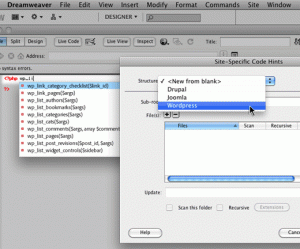
Site-specific code hints
The Site-specific code hints feature lets you customize your coding environment when working with third-party PHP libraries and CMS frameworks such as WordPress, Drupal, Joomla!, or other frameworks. Theme files for blogs and other custom PHP files and directories can be included or excluded as sources for code-hints.
Subversion support enhancements
Dreamweaver CS5 expands its support for Subversion, allowing you to move, copy, and delete files locally, and then synchronize changes with your remote SVN repository. The new Revert command allows you to quickly correct tree conflicts or rollback to a previous version of a file. Additionally, a new extension allows you to specify which version of Subversion you would like to work with on a given project.
Adobe Dreamweaver is a very powerful tool, especially when bundled with other tools Adobe has created to work with Dreamweaver. The Web Premium Collection includes Dreamweaver CS5, Flash Catalyst CS5, Flash Professional CS5, Flash Builder 4 Standard, Photoshop CS5 Extended, Illustrator CS5, Acrobat 9 Pro, Fireworks CS5 and Contribute CS5. This is exactly why I chose to work with Dreamweaver as my main Web Authoring tool.
Microsoft Web Expressions is a decent tool to use when creating web sites. Web Expressions is not as powerful as Dreamweaver in terms of coding and Dreamweaver CS5’s ability for “live code view” which allows you to edit the code and instantly see results in next pane. Microsoft Web Expressions does not tightly integrate other technologies such as Flash or Fireworks, which in my opinion, can mean the difference between an eye-popping website and just an eyesore. Web Expressions is Microsoft Windows only program, meaning it does not work on Linux. My laptop is not really that powerful, so I run Ubuntu 10.10 on it because it’s fast, uses fewer resources and is very reliable. Combine this with the use of the Web Premium collection and I have a portable development environment I can take on the road with me.
Another tool that came into mind was Coffee Cup’s new “The HTML Editor 2010 SE”. While this product is new, and only $49 it still doesn’t compete with the complexity of Dreamweaver CS5. With a product like The HTML Editor 2010 SE I would be forced to load other programs such as Paint.NET and NotePad++ onto my system just to keep up with the features of Dreamweaver CS5. So the fact that The HTML Editor 2010 SE does not integrate other necessary designing tools into its environment is a reason for me to steer clear of it.

-
How To Rank Higher In Search Engine Results

The amount of visitors that you get will determine how successful you are. Sites that have merchandise rely heavily on visitors. How many visitors a site gets is very dependent on its search engine rankings. Search engine optimization can increase these rankings. Want to learn more? Read on!
A properly coded site is an important part of a successful SEO strategy. For instance, if most of your site relies on JavaScript and is poorly coded, search engine spiders cannot index it. Your website won’t be indexed if it contains a great deal of Flash content and does not have alternate textual descriptions.
You should have just enough keywords to succeed at SEO. Focus on keeping each page’s keyword content well under 20 percent.
TIP! To boost your PageRank, you have to attract and maintain the visitors on your page. The search engine results for your business can be affected by the time consumers spend looking at your site.In order to really increase your PageRank, you need to not only get visitors to your site, but keep them there. Increasingly, evidence shows that the time a viewer spends looking at a website (per Quantcast scores and other measures)increases the page ranking. There are a few ways to increase the visitors time spent. Including features such as discussion areas and interactive forums is an effective way to get your visitors to stay for a while.
Search Engine Results
There are a few things that you can do to optimize your search engine results. These tags are worth the time it takes, because they will offer a little summary of what the page entails, either on your site or in the search engine results. It is important to write meta tags which are short but informative. This can attract more readers to your website, even if your site wasn’t at the top of the search results.
TIP! To make it easy for people to read about new product offerings and bring them to your website, publish descriptive blog entries that can be subscribed to by readers via an RSS feed. Feeds like this detail your services and products with images, descriptions and prices.Position yourself as an authority in your niche. This is a lucrative internet marketing tool. You need to design a website that appeals to a well-defined consumer niche and that is easy for members of that group to find. Remember to think of your customers’ needs first, and your needs second.
A site map for your business site is an important part to any SEO strategy. Spiders use the site map to find out information regarding your website. You might need more site maps, if you have a big website. Try not post more than 100 links to a map.
If you know enough techniques and strategies, you can do your search engine optimization on your own. There are plenty of resources out there that can help you. Try purchasing some highly-rated books or reading some popular websites to learn what you need to know.
TIP! Position yourself as an authority in your niche. This strategy is highly effective in internet marketing.The amount of visitors determine the perception of site success. This is especially true if it’s a retail website. A site will get more visitors if it ranks well in search engines. By utilizing search engine optimization, you will increase your ranking. SEO can work for you when you use this advice.
