Author: cbmstage

  • What’s The Right Price For SEO?

    What’s The Right Price For SEO?

    Whats the right price for SEO?What is the right price for SEO? This is a question many business owners have started to ask themselves. There are a few different models SEO firms use to present prices. Some use an hourly rate or charge by the project. An hourly rate’s range can vary widely from $40 to over $1000 an hour. Usually, the project model allows the client to pay a portion of the cost at certain intervals throughout the project. Other SEO companies utilize a month to month model that may be used in conjunction with a contract.

    Month to month models are common, but can be quite risky when contracts are applied. A powerful SEO campaign is complicated and constantly being redefined. With the resources that are required month to month frequently changing, it makes it difficult to determine a monthly SEO price. Accurately predicting month to month costs is tricky because client’s requirements and campaigns are not only different, but personalized. For this reason, many companies charge a great deal more than they are providing. Unfortunately for those who have an overpriced contract they are stuck paying an exorbitant amount of money for SEO services that they are not actually receiving! XTELWEB has no contracts because we believe that we should earn your business every month.

    A lot of people are curious to know what a fair price for search engine optimization would actually be.  In reality, there is no industry standard so cost can vary from reasonable to outrageous.  Many factors are considered to calculate a price for search engine optimization.  Some of these factors are the size and complexity of the website, the quality of the website’s optimization,  the website’s current ranking position, and the overall difficulty of the project.  Other factors also include size of the market and competition, the demand for the SEO firm, and how much time and work that needs to be completed to receive the results the client desires.

    For more specific information please give XTELWEB a call at (727) 569-1079 or for any questions please use or quick contact form.  We offer professional and affordable website design and search engine optimization.  Every business is unique, that’s why we offer complete custom and personalized service and SEO packages.

  • When It Comes To WordPress, We Will Teach You It All

    Do you want to have your very own blog? Maybe you’ve already started a WordPress blog and aren’t thrilled with how it’s going. There are lots of ways to provide your visitors with an attractive and inviting blog. Use this advice for a better WordPress site.

    Choose an interesting and unusual design for your WordPress blog. It is tempting, but it is not going to help people think the best of you. It is imperative to make a site that highlights your individuality and the personality of your business.

    TIP! A clean permalink will make it easier to post blogs with long titles. Excessively long titles make for cumbersome, clumsy URLs.

    With WordPress, users can easily have video blogging on their site. This might take some work, but you won’t regret it. Most Internet users are very visual. A video is just able to do so much more than the written word can when it comes to communication.

    Clean up comments and content that don’t add anything to your website. That way, the site stays suitable for the interested folks who read it. To get rid of spam on a daily basis, Akismet can be a useful plugin.

    TIP! Use Title and Alt when you are uploading pictures. You should include alt text when adding images to your posts.

    Do you posts garner lots of comments? If this is the case, it can be hard to sort through them all. Look for a plugin to add page numbers at the end of the comments section. This makes your website easier to navigate.

    Spend a little extra time on your pictures if you want to improve your rankings on search engines. Putting in alternate text and title tags is crucial. If someone pins your image to the site Pinterest, your title tag is what will appear on the screen.

    TIP! Video blogging is easy with WordPress. It may take more effort, but it’s worth it.

    The greeting appearing at the head of the WordPress website page should be very engaging. This helps your visitors feel more welcome and interested, and the messages can be personalized depending on how the visitor got there. It personalizes the experience. Use WP Greet Box to do this.

    Allow your users to access your articles easily by email. Many people who won’t have access to social media will still want to share with friends. Try using a plugin like WP-Email.

    TIP! Learn about WordPress before you install it. If you plan ahead, things will flow better once you get started.

    There are quite a few things you must do to have a successful blog. Creating a superior blog takes the right know-how. Hopefully, you now have a better understanding of WordPress. You can now begin to put this knowledge to great use on your site, and build greater interest.

  • Web Design Tips – Do's and Don'ts

    A website design displays the best qualities and potential of the individual or business it represents.

    While a poorly designed website can repel most visitors, a professional custom web design can open a world of prospects. Some of the major dos and don’ts of custom web design include the following:

    1. The Compatibility of Custom Web Design

    Do make sure that any functions included in your website are compatible with the current browsers, such as Firefox, Chrome and Internet Explorer.

    Don’t upload your website to a server if it’s not compatible with most browsers. Always check the authenticity of a server before uploading your work.

    2. Safe and Secure Custom Web Design

    Do make sure your website is safe from viruses and hackers. If your website handles sensitive information, such as credit card of social security numbers, it is absolutely crucial to make sure your website is guarded with the latest security protocol.

    Do not share the security information of your website with anyone. Your main priority is to protect the sensitive information that your customers have given you in good confidence.

    3. The Scope of Custom Web Design

    Do check the scope of the website you’re designing. Keep the target o f your website clear in your mind so the most important elements stand out the most.

    Do not design sites that are heavy with content and overcrowded with links. Keep it simple. Get to the point. A successful website is user-friendly and easy to navigate.

    4. The Documentation of Custom Web Design

    Do make sure that your website contains only relevant information that gets to the point and is easily understood. Using specific keywords not only keeps readers focused on the right topics, but it also helps with search engine optimization.

    Do not fill your custom web design with useless links and irrelevant text as this will only divert a reader’s attention from important topics. Make all of the information you provide simple and professional.

    5. The Layout for Custom Web Design

    Do design a website with specific requirements in mind. Use only necessary graphics or animations as the more you have on the site the longer it will take to download.

    Do not think that it takes a lot of imagery or decoration to impress visitors. People want fast information and an easy way to buy the products they need. Extra images, sounds and animations are only a distraction.

    Contact Us to schedule your website design project today!

  • Get More Traffic With These Great Search Engine Optimization Tips!

    Many website owners simply market through paid advertising slots and articles and hope for the best. Although these techniques might work, only well-executed SEO can be effective in boosting those websites to the coveted front page of the search results. The advice in this article will put you on your way to obtaining optimal website traffic.

    Search Engines

    Search engines may have difficulty understand dynamic language and session ID names. Keep this in mind when you create your URLs. Search engines won’t get anything out of this, so make sure that your URLs have meaningful language and keywords.

    TIP! Several articles on different topics are better than one long article on your website. Long pages are weighted less highly than short ones by search engines.

    Never utilize Flash on a site that you wish to be optimized. Spiders can not read it and it is slow to load. It’s important that your website’s content is easily visible to search engines.

    Once you have decided on the keywords or key phrases that are most relevant to your website, use them in the title of your web page. Your title should be attention-grabbing and relevant to your content, in addition to containing keywords, since it’s the first thing a visitor will see when deciding whether to visit your site. This will cause your site to be clicked on because it best fits what the search engine user typed in.

    Search Engines

    TIP! Make sure when writing internal links and backlinks for your website that you use good anchor text. If the text you use is generic, like “click here,” you are missing out on a great opportunity to optimize your site a little more.

    Use an accurate title tag to make sure that search engines will understand your page content. Use 60 characters of fewer because search engines typically will not display any more content than that. Tags generally carry less weight past that point anyway.

    Including relevant keywords in your webpage’s URL will help it be more easily identified by search engines. Should there be special characters or numbers in the URL, you must consider whether people will actually search using them. This can hurt your search rankings. It’s vital use to use keywords that people will search on that have relevancy to your site’s topic in order to boost rankings.

    You might actually be able to get some traffic to your site while your site is ranked on the back pages, but your traffic would exponentially increase as soon as you started to implement the proper SEO tactics. By using the tips you’ve just read in this article, you can start to raise the profile of your website.

    TIP! You should look at the source codes on the websites of your competitors. That way, you will be able to determine the way they use SEO for their site and the keywords they find valuable.
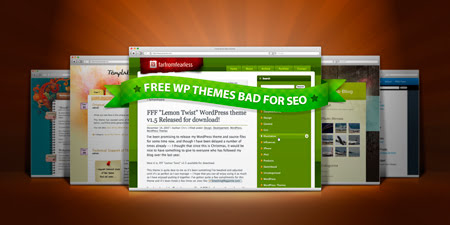
  • How Free WordPress Themes Hurt Your SEO

    How Free WordPress Themes Hurt Your SEO

    Everyone likes getting something for nothing and free WordPress themes are no exception. When new users start out on the content management system, they encounter unexpected expenses. Domain registration, hosting, installation or set-up costs and purchasing a theme. It’s no wonder that many new site owners choose free WordPress themes instead of buying premium themes. But the old cliche, there’s no such thing as a free lunch often comes into play when using free WordPress themes.

    Free WordPress Themes Pros

    The most obvious pro about free WordPress themes is, self explanatory: they’re free. Free is usually a good thing. Not only do they save the cost of having a theme designed by a professional, they also save time in having to configure your site. Free WordPress themes typically come with design features which allow for a bit of quick customization. Then there’s the support if something breaks. What’s more, many free WordPress themes come updated or are compatible with the latest version of WordPress.

    Another pro of using a free theme is chances are someone else has used it. That means there’s likely user feedback or a ratings system which demonstrate how user friendly the theme is. Potential users can also Google the theme’s name and/or the designers name to find out more information.

    SEO WP Themes

    Free WordPress Themes Cons

    While it’s great to stumble upon free WordPress themes, it’s not great to discover the truth about many of them. Most theme designers don’t put out free themes to be better citizens. They do it because of ulterior motives. As mentioned, you might get support if something breaks, but the support is limited, if available at all. However, this is not the biggest con of free WordPress themes.

    • Free WordPress themes aren’t original. If and when you do find a perfect free theme, you won’t be the only one using it. And that’s bad for SEO.
    • Free WordPress themes may have hidden code. Users should be very careful. Some designers insert what is known as “base64 code”. This obscured code may be a conduit to make the site send traffic elsewhere. That can be considered black hat SEO and your site will be penalized.
    • Free WordPress themes might be “locked”. Free theme owners might not only find nefarious code, they may not be able to get rid of it without wrecking their site. If the designer is deviously clever enough, they won’t let users remove that code without essentially breaking the site.
    • Free WordPress themes could contain backlinks to sites that are completely irrelevant to the user’s content. Not only will it be a nuisance, it will drive down a site’s SEO. Sites which link to other sites which are completely irrelevant to one another will be penalized by index robots.
    • Free WordPress themes may limit functionality. Of course, you may not know that until after you’ve taken the time to upload it. Certain features which make the theme so attractive may be a pay to play scenario.

    If you want to avoid the headaches and bad SEO factors, you should have your site custom designed. To get an original, custom site, contact CQuinn Design and we’ll design the perfect site for you.

  • What is Bounce Rate and Why is It Important?

    What is Bounce Rate and Why is It Important?

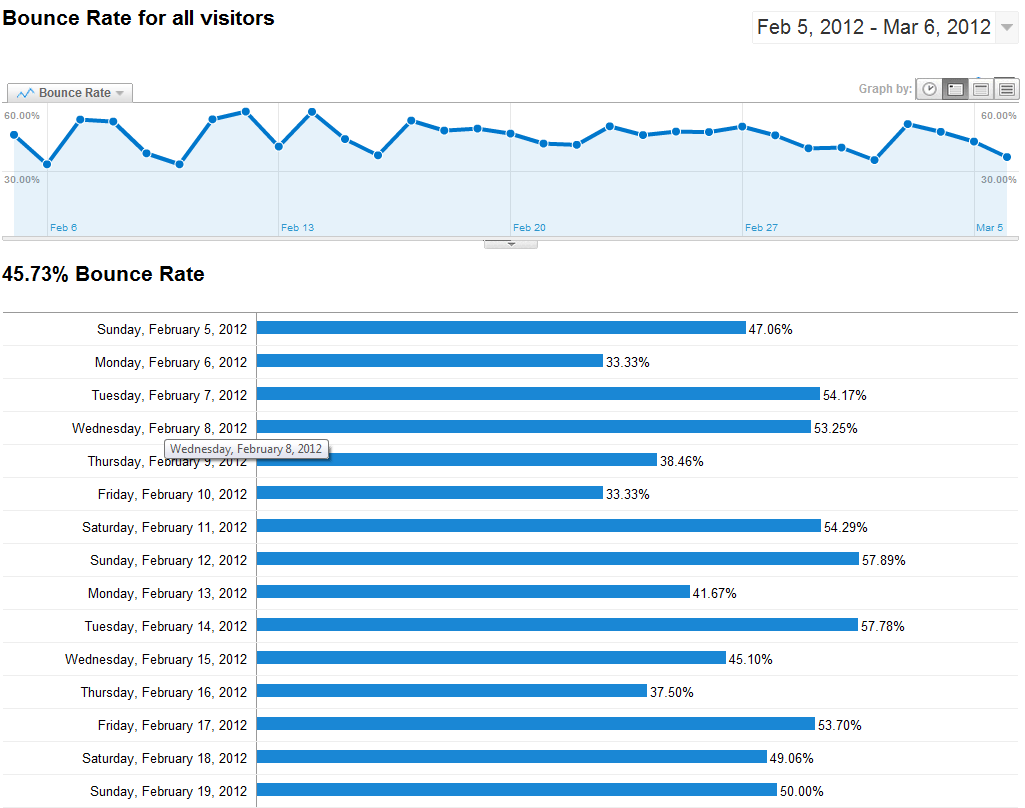
    The term “bounce rate” simply means the percentage of total visitors to a website which have clicked on another page within a site versus visitors which took no action and left it. Visitors which click through to other pages and/or stay on the site for a long period of time help to lower the bounce rate. However, visitors that click ads posted on the site, do not visit other pages, close their browser, navigate away by clicking the back button or type a new URL all contribute to a higher bounce rate.

    How Bounce Rate is Measured

    Bounce rate is measured by dividing the numbers of visitors which “bounce” by the number of total visitors to a site on a given day. For example, if a site receives 4,000 hits on one day and 2,800 visitors navigate away or do not visit other pages, the bounce rate would be 70 percent or 2,800 divided by 4,000. However, using the same number of visitors 4,000, with only 1,400 visitors bouncing, the rate would be only 35 percent or 1,400 divided by 4,000.

    In these examples, 70 percent and 35 percent show both a high and a low bounce rate. However, these numbers can be deceiving. While 70 percent might be classified as a high bounce rate, it does mean visitors are finding and clicking through to the site initially. And while 35 percent is a low rate, falling below it into the 20-percentile means not many visitors are finding the site.

    What High Bounce Rates Mean

    As mentioned, high bounce rates means visitors are not staying on the site because no further action is being taken (i.e. not visiting other pages, immediately navigating away). The reasons for these poor metrics is more complex and is particular to the site.

    High bounce rates can be the result of a few or many factors. The largest reason is often dissatisfaction with the content on the site. Visitors search for something specifically, arrive at the site and are turned-off by the lack of content relevance. This is a strong indication the keywords associated with the site are not in concert with the content or poorly matched. Other reasons include: difficulty of navigation, confusing color/content schemes and/or lack of proper functionality.

    How to Lower a Site’s Bounce Rate

    The most effective way to a lower website or blog’s bounce rate is to ensure the META tags are correct–they must be relevant to the site’s material, using keywords which are natural to the content, testing the site’s functionality to ensure each page link works properly and review the site’s internal coding.

    A less technical approach is to look at the site through a visitor’s eyes. Is it too complicated? Are there too many colors/schemes which distract from the content? Is the site littered with ads? Are page links in a prominent location? Is the content on the site informative relative to the subject material? Do the keywords stand-out?

    Visitors make a decision on whether to stay on a page based on content, usability and access. Without making these a top priority, visitors will simply go on to other pages. After all, there are plenty of other sites on the Internet.

    If your site has a high bounce rate or are unsure about how to measure its bounce rate, contact XTELWEB for a free report. In a short time, you’ll know exactly what your site’s bounce rate is and steps that need to be taken to improve it if necessary.

  • Top WordPress Plugins for Auction Sites

    Top WordPress Plugins for Auction Sites

    Wordpress Development Company XTELWEBWe all know that WordPress is powerful and versatile. Anything can be accomplished with the right WordPress developer and designer. We utilize WordPress for most of our clients because of these two facts. WordPress is also search engine friendly but we will save that for another blog post!

    Anyway, back to point of the article here. I have to apologize because when WordPress is involved, I can talk for hours. XTELWEB recently completed a WordPress development project for a company in Cincinnati, Oh – www.svncincinnati.com, commercial real estate investors. This project started as any web development project starts, as an idea. We are very honored that the client has chose to work with XTELWEB and we really appreciate each and every one of our clients.

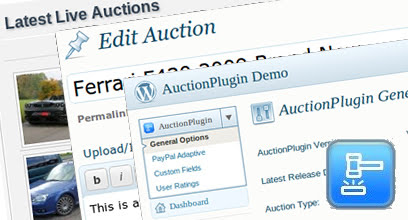
    The client needed to add “auction” functionality to their website, and they needed it in a timely manner. This was not something discussed in the original web design plan, but it’s something we knew we could do. We looked at two WordPress Auction plugins while analyzing the clients needs. The client wished to sell, or auction, commercial real estate properties on their website. What we then found out was that the client had two types of auctions that both had separate needs. Lets look at the auction plugins:

    Sitemile Auction Plugin: Sitemile provides many different products for WordPress including the auction plugin we are talking about now. To me, out of the two plugins I am going to discuss, this one was more versatile then the WP-Auction plugin we also tried. Sitemile has generously provided a YouTube Video showcasing their plugin.
    Wordpress Auction Plugin by Sitemile

    The Sitemile Auction Plugin has many features that make it a complete plugin for any auction site. It’s very versatile and modifying it to fit your needs is very simple.

    WP-Auction Plugin: Although Sitemile’s auction plugin was a better fit for SVNCincinnati.com, we did have a chance to try another plugin. This auction plugin, developed by wpauctions.com is also a great product. It’s best to compare the features of the two plugins before you decide which one is right for you.

    WPAuctions.com Auction Plugin

    So we discussed the auction plugins for WordPress and what about the other type of “auction” SVNCincinnati.com provides. Well this is reffered to as an Absolute Auction, which basically means it takes place in person. It’s more or less an event and thats how we treated it. By using WP-Events Plugin we were able to achieve the clients need. This plugin is even more versatile than any other WordPress Plugin I have ever seen. This was developed by programmers that truly understand how to create dynamic code that can be utilized in almost every fashion. Their documentation is very complete and provides examples, how-to’s and more! This is definitely worth the money upgrading to the professional version.

    Well there you have it! If you are looking for an Auction / Event Manager plugin for WordPress, these are definitely worth taking a look. We develop all types of custom web design including Auction web sites, Commercial Real Estate company web sites and more. With WordPress and the right developer anything is possible.

  • Viral Video Marketing – Affordable Video Marketing from XTELWEB

    Viral Video Marketing – Affordable Video Marketing from XTELWEB

    Viral Video Marketing – XTELWEB

    Let us market your video’s. We can take 1 video and turn it into 1,000 and then upload it to a dozen video indexing sites like YouTube, Yahoo!, Metacafe, Blip.tv, DailyMotion, etc…

    The best way to get to the top!

    XTELWEB | 727-359-5150

  • Master The Art Of Blogging With WordPress

    WordPress has been around for more than a decade, and it has helped so many people establish a presence on the Internet. Regardless of how long bloggers have been using WordPress, there is always more to learn. The following piece is meant to provide useful tips to those individuals.

    Choose a website design that is individualized for your WordPress site. Although creating an individual design takes more time, it will make your website look more personalized. You need to show your individuality with your site.

    TIP! Don’t choose a design that’s identical to what others that have a WordPress website use. Although creating an individual design takes more time, it will make your website look more personalized.

    Clean up long titles in the permalink. For instance, an overbearing or difficult URL would be along the lines of “Top Tips For Parents of Unruly Children.” Instead, you could use something like: “Smart Parents Control Kids” if it works with your SEO strategy.

    When you are using WordPress, get familiar with the tools and features available in the application. For example, if there’s a Kitchen Sink button you click, you’ll be able to get a bunch of other choices that allow you to format and import what you want so posts can be unique. You also may notice that there’s a Screen Options tab where your admin pages are. This can control many different formatting elements.

    TIP! Devote some time to learning about the various options and tools that you have at your fingertips when you use WordPress for blogging. For example, clicking the Kitchen Sink will give you choices such as importing and formatting posts.

    Unless you change the settings, all your posts will be listed in chronological order. Changing the date is the first step to rearranging your list. Open a post and look at the upper right hand corner. There you will find the date. Changing the date and saving it will re-position it.

    Are you overwhelmed by the comments on your site? If you do, it may be hard to go through the comments for you and visitors. To remedy this, you can use a plugin that adds page numbers to your comments section. This makes your website easier to navigate.

    TIP! Prior to installing WordPress, find out as much as possible about the program. The more prepared you are, the simpler the process of setting up your page will be.

    Create a charming greeting for your website. Not only does this personalize your website, it welcomes guests based on how they found your blog. This makes your site seem more personal.

    Avoid common words and phrases for your user name. Having terms like administrator or admin as your name will make your blog much more attractive to bots who will attack and access your site. It’s a security risk. Delete usernames that appear with “administrator” or “admin” on your user pages. Find creative user names that you can remember.

    TIP! Devise a schedule when you are set to begin making posts. If you schedule when things must be posted, you’re more likely to actually post them.

    Organize that media library often. Uploading images without thinking of organization can cause havoc to your site. Set up folders right at the outset, and put images into the correct folders. If you’d like to use an image again, you can find it easily.

    WordPress has long been known as a terrific method of creating blogs and providing informative, useful content. Familiarizing yourself with WordPress allows you to enjoy the ultimate blogging experience with little trouble. The information in this piece ought to prove useful to all those wanting to launch their own blog.

    TIP! Make sure that your work is saved at all times. It is probably not the truth.
  • SEO Mirroring

    Multiple copies of web sites or web pages, often on different servers using different domain names. The process of registering these multiple copies with search engines is often treated as spam indexing, because it artificially increases the relevancy of the pages. This spamming technique can be detected by the search engines and the site can be penalized for it by a lower ranking or removal from the database.