Category: Uncategorized

  • SEO optimized HTML – What sets us apart?

    SEO optimized HTML – What sets us apart?

    SEO is an acronym for search engine optimization.  Hiring an SEO company can be a huge decision that can make your website climb to the top of the search engine results page.  People are searching for all types of things on the Internet.  Some of the sites that they use to search for other websites are Google, Yahoo!, Bing and Ask.  These are the top four search engine sites used on the web today.
    Search engine optimization starts with a solid foundation of your companies website design.  We also provide website design. The thing that sets our web design apart from our competitors is that our web development has the ability to understand SEO, therefore incorporating it into your design.  Right off the bat our web developers are researching your competitors keywords and keyword phrases, and then setting them up in your websites Meta Tags.  Meta Tags are a way for a search engine to classify your website.  You can define things in your website like the Title, Description, Content, Keywords and GeoTargeting among other things.  With this knowledge your website will be built on a solid foundation that will make finding your website easy.

    There are different types of SEO that you need to be aware of.  Just as the name implies, these are all-natural rankings that are not paid for. Organic SEO can include on-page optimization and SEO copywriting or unique content creation.  This type of SEO is mainly focused on the development of your website, the content being created on your site, keywords and phrases embedded into your website, including meta tags and other areas of focus.  If your site does not have a strong organic SEO foundation, then any other type of SEO you do can prove to be worthless.

    XTELWEB will analyze your websites code, keywords, links and graphics to ensure that every possible step to improving your sites rankings are taken.  We know how to build websites that other search engines like.  Having a page that is SEO optimized right from the get go can prove to be the most powerful investment you have ever made.  We built a site last month, TerrazzoFloors.net, SEO Optimized HTML Imagewithin about 2 weeks this site already had a Google PageRank of 0.  Now I know that doesn’t sound impressive, or does it?  Anyone that knows anything about Google PageRank will tell you that this is an incredible feat.  The site was not even complete, but yet the main page had a PR 0?  That’s because we didn’t overlook anything when it came to optimizing this website.  Each and every keyword was researched, the META tags were defined on every page, the CSS and HTML was optimized for speed (part of SEO), image and alt-tags were defined and the list goes on and on.   I could tell you every little thing we did, but I would be spilling trade secrets.  Just know that when we say we build SEO optimized websites, we mean business.


  • You Can Get Good Source Of Ideas About Website Creation In The Article Below

    There are many different uses for websites. It is used for information sharing, entertainment and other uses. All websites should begin with someone who has a grasp of what it takes to create a successful website. Ahead are some great design tips to assist in creating a website for nearly any purpose.

    A simple to navigate website will retain visitors. Important links should be highly visible on every page. Menus render your website easier for users to surf. Post links that lead back to the homepage on each page of your website to make navigation easier for your users.

    Don’t use lots of graphics. Graphics are critical, but they can also clutter up a page. Do not use graphics simply for decorating; utilize them for true improvement. Having the right amount of graphics will improve your site’s usability and reduce the clutter.

    If your site users will be registering to use your site, you should use their personal information to auto-fill forms. When a user needs to enter their information multiple times to sign up for various options you give them, make it so that they don’t have to enter duplicate info from beginning to end on their own repeatedly. Saving the user’s information in this way simplifies work for them, and is much appreciated by your website visitors.

    Keep in mind that you shouldn’t overuse JavaScript. Even if JavaScript opens up interesting possibilities for your designs, not all your visitors will be able to see your content properly. Keep in mind that your visitors use different web browsers. Keep in mind that not every single person who visits your site has the most up to date browser version. You should also be aware that some of your users will have JavaScript disabled through their browser. In either case, you are preventing your visitors from using all or some of the features of your website.

    As stated before in the introduction above, websites can be used for many things, such as providing information, communication, and entertainment. You will need to learn how to design first. When you use what you have learned from this article, you can create websites for any reason you want.

  • So Long Internet Explorer 6, Holding Less than 5% Market Share

    I can guarantee I am not the only web designer happy about this one.  There has been news on the internet floating around about the death of Internet Explorer 6 within the past month.  Google is showing support by joining the  anti-Internet Explorer 6 campaign that basically states Google will not be supporting the nine year old browser anymore.  Really when you think about, designing your CSS and HTML (or XHTML) coding for clients who insist on using IE6 really holds back your creativity. Not to mention this could end up costing your company more because weeding out all those bugs can be timely.

    Google Reader, an RSS service that posts feed updates on its site using RSS (Really Simple Syndication) or Atom standards is not going to support Internet Explorer 6 anymore.

    “Reader is a cutting edge Web application, and this will allow us to spend our time improving Reader instead of fixing issues with antiquated browsers,” said Mihai Parparita, an engineer with the Reader team, in a post to group’s blog last Monday.

    There is a troubleshooting post on Google Reader’s help page stating the phase out of the old browser.

    Another web analytic company, StatCounter , recently released data showing that Internet Explorers market share is dwindling.  The amount of users currently using Internet Explorer 6 has fallen 4.7% which is down 11.5% from a year ago.  These usage trends were based on over fifteen billion page views in the month of May 2010.  Currently IE7 is holding the largest market share, with FireFox 3.6 and IE7 following behind.

    One of the main reasons that IE6 is still in use today is that many corporate users are still using Windows XP which ships with Internet Explorer 6.  A lot of these company’s were hesitant to update to Windows Vista, and Windows 7 is so new that  IT is waiting for analysts reports to come out on the performance of Microsoft’s new OS.

    There are plenty of other websites that have dropped IE6, for instance YouTube dropped support earlier this year. There is even a website which lists sites that have dropped IE6 support ,you can even add your site to show you are no longer supporting this dreadful internet browser! We have even written a few posts about Internet Explorer 6 bugs, css and xhtml coding.

  • Solid Ways That Make Blogging Easier To Handle

    Everyone is talking about running a blog lately. Blogs are webpages that let you post interesting content about any topic that you find interesting. They are generally more personal and informal than webpages and are one of the top growing areas of social media. If you have a blog you need to improve, or are wanting to start up a new one, keep reading for some great ideas.

    Use pictures wisely with your blog posts. Are you aware of the saying that a picture contains a thousand words? The inclusion of images in your blog can enhance your blog by breaking up text content. You want people to be interested enough to read your post and also get an idea of what the post is about before reading the entire thing. So, try to use images as often as you can.

    Keep adding fresh content to your blog so that readers have new and interesting material to read and a reason to keep coming back. Successful blogs usually post new material every day. Daily posts can seem overwhelming, but give yourself a head start and prepare several weeks worth of posts before beginning your blog. Then you have posts later that can fill in if you run out of ideas.

    TIP! Regularly post new content to your blog. If you want to grow your readership, it is necessary to inject fresh content regularly.

    Social Media

    Provide social media links, so readers are able to follow you. Social media networking sites such as Facebook, LinkedIn, and Twitter are very helpful the success of your business. These portals give you multiple options to reach out and communicate with your readers and draw more followers in.

    If you are writing for your own blog, keep the style of your writing informal and captivating. A blog is meant to be fun and engage your readers, not preach to them about something. Be certain that you remember that. You want to connect to your reader base in a fun, informal manner so that they will come back for more.

    TIP! Don’t ever copy things from the web. Plagiarism is really serious, and it can make you lose credibility by doing something like this.

    As you decide on which keywords to use for your blog, remember that it is crucial to select unique ones. Using the keywords that other sites use will get your site buried under a morass of other results. If you want visitors to return, you need to be unique with your blog.

    Posting regularly is key to having a good blog. Since new blogs appear continually, if you do not post regularly, readers are apt to find other blogs to read. Exceptions, like holidays, will be forgiven by your readers, but the rest of the time you must stick to your schedule.

    Search Engines

    TIP! Don’t make blogging your whole life. Failing to give yourself some time off and away from the computer will lead to dangerous burnout.

    Make sure your blog posts are relevant to rise to the tops of the search engines. If the search engines favor your site, your readership will increase as well. You will see a substantial increase in your readers when you follow this advice.

    Think about making a custom homepage for the blog. Basic blogs tend to have a homepage that is made up of the most recent posts, but you can liven things up by making yours a custom one. This is especially helpful since you will most likely be found via links or search engines.

    The best and most popular blogs grab a reader’s attention. By carefully following the advice of this article, you can become a more successful blogger and expand your reader base. Some bloggers are in it simply to enjoy themselves, while others are out for professional or financial rewards. Whatever your goals are, have fun while you’re doing it.

    TIP! Your blog entries should be succinct. While it is important to provide the depth of detail that your readers are looking for, blogs that are too long and verbose will simply put your readers to sleep.
  • How to use excerpts in WordPress Blog posts to dazzle website visitors

    How to use excerpts in WordPress Blog posts to dazzle website visitors

    WordPress users can take advantage of many resources. There are thousands of plugins, endless forums and entire sites devoted to the CMS platform. Unfortunately, all of this information is not organized into a neat index or table of contents. Therefore, doing something as simple as adding an excerpt WordPress post feature can become difficult as users don’t know which method is not only effective but compatible with the version of WP they are running.

    All this, not to mention the comfort level users have with manipulating code in the editor through the dashboard. Some will be able to take a little information and develop it without problem. Others who rely on the “Visual” editor will likely be uncomfortable changing CSS code.

    Excerpt WordPress Blog Posts Benefits

    The main reason behind adding an excerpt WordPress post feature is to “truncate” the size of the page body. Long posts, even if well-written, well-formatted and informative tend to become a bit of a bore. So, being able to entice visitors with a little information to get more clicks, lower bounce rates and increase the time on site average is a three-for-one deal.

    Adding Excerpts to WordPress
    Image Courtesy of FieldstoneAlliance.org

    Another benefit is it reassures visitors the site has a specific purpose and is devoted to a topic or niche. For instance, if a visitor to a football team’s fan site saw posts not only about the team but how to short sale a home, they would immediately tune out and click away. However, if the site’s content is consistent, it convinces readers they have arrived in the right place. Adding an excerpt WordPress post feature does just that.

    How To Excerpt WordPress Blog Posts to a Site

    There are two principle ways to add an excerpt WordPress feature, applying it to posts: through the Visual editor’s “Kitchen Sink” menu bar or by adding code to the .php file(s). (Depending on the version of WP being run and the theme’s options, this might be in more than one .php file.) If you want to get really fancy, try this thumbnail excerpts plugin – for people who like visuals 🙂

    Kitchen Sink Method

    Log into your WordPress dashboard and select Posts >> All Posts or Posts >> Add New. If you are applying an excerpt WordPress blog post feature to already published post, go to “All Posts”. If you are working with a new post, then select “Add New”. To create an excerpt, simply write your post, then place your mouse at the end of a paragraph or sentence and click on the “Insert More” icon on the top of the Kitchen Sink menu. The icon is a rectangle, followed by three ellipsis,  and an upside down “U” shape.

    In the alternative, you can simply insert <!–more–> into the HTML code, then switch back to the visual editor.

    Your WordPress SuperHero's

    CSS Code Method

    This is accessible in either the index.php, the category.php  and home.php. Find the following code:
    [php]
    <p style="padding-left: 30px"><code><?php the_content(‘Read the rest of this entry »’); ?></code></p>
    [/php]
    Remove it, and replace the above code with this string of code:
    [php]
    <p style="padding-left: 30px"><code><?php the_excerpt(); ?></code></p>
    [/php]
    Then, on individual posts, simply add this line of HTML:
    [php]
    <p style="padding-left: 30px"><a href="?php the_permalink(); ?>" title="Read the rest of <?php the_title(); ?>Read the rest of this entry »</p>
    [/php]
    That’s it, your site will now excerpt WordPress posts.

    If you want more WordPress tips, please visit our blog. Should you wish to customize your WordPress site or are interested in building a WordPress site, then don’t hesitate to contact us.

  • Website Architecture: From Wireframes to Domains

    Website Architecture: From Wireframes to Domains

    Website architecture is the practice of planning the aesthetics and functionality of a website. It involves such things as wireframes, a sitemap, interaction, coding and domain name. The reason website architecture pre-planning is so important is because it not only has to function as intended, but has all the necessary on-page SEO.

    You might ask what is a website wireframe? Or what is a sitemap? Well, let’s examine and explain the fundamentals of what goes in to envisioning, developing, producing and launching a site on the Internet.

    The Goal of Website Architecture

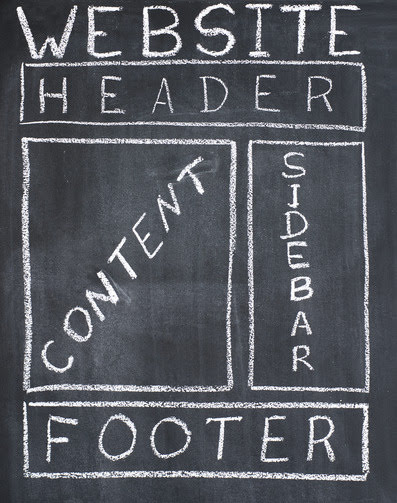
    Just like building a home, there must be a blueprint to build a website. And website architecture is developing that blueprint or what’s known as wireframes. A wireframe is a rough “sketch” of what a site will look like when it goes live. Of course, this is only a visualization tool and does not perform any functions. But it is useful in helping to establish where elements on the pages go.

    Google needs to understand the structure and content of your web site. By creating a Sitemap…you inform the engines when your site was last updated [and] how important one page is relative to other pages on your site…Huffington Post.com

    The goal of website architecture is to lay a foundation to review and reference when creating the site.

    It isn’t unusual to have many revisions along the way to help incorporate items inadvertently omitted or to eliminate elements that aren’t truly necessary. These changes only serve future site visitors better and help to improve search engine optimization.

    Fundamentals of Website Design

    Website wreframeThere are a few fundamental website design processes which are routinely followed by site designers. And that process is called website architecture or information architecture. There are three fundamental elements in website design:

    • Sitemap. Think of a sitemap as a digest or index system that includes the pathway to every page on a website. This is often the first “working” visualization drawn up because it helps to establish the order of pages. It is often drawn in a triangle shape, consisting of boxes labeled with the page’s individual name. Once the site is actually built, a sitemap is included in the code to update to search engines about changes as they occur on the site.
    • Wireframe. The wireframe is a drawing, usually depicting the home page. Additional wireframes can also be drawn for other pages. Wireframes show where functional and aesthetic elements will appear on the page. These include things like business logo, search box, widgets, call outs, slider, images, etcetera.
    • Interactions. Interactions are a mock-up of how pages relate to one another, including the home page. Interactions take into account the navigability of the site and sub or child pages in relation to the main or parent pages. It is website architecture in it’s most quintessential form.

    The importance of website architecture is much like taking a road trip without a map. You might eventually arrive at your destination but not without a considerable amount of detours. Professional site developers use website architecture to keep the process streamlined, thereby keeping cost down.

    If you want to launch a website but are unsure about the process, then contact us. We can help your business conceptualize and develop an eye-catching, fully functional website that is search engine friendly from the day it’s launched.

  • Get The Knowledge You Need About WordPress

    Would you like to start a blog of your own? Maybe you have a blog with WordPress, but are not pleased with it. There are a few ways to have your blog appear more attractive to your visitors. Follow the tips presented here to create a highly dynamic WordPress blog.

    Choose a website design that is individualized for your WordPress site. While it may seem appealing to use a common design, your readership may not be impressed. Make a site that’s as unique as your business.

    TIP! Choose a design that is relatively unique when making your WordPress blog; don’t just choose the design everyone else is using. Though it is less time consuming, your site will blend in with other blogs.

    WordPress is full of options, features and tools that you can use to improve your blogging site. For example, if there’s a Kitchen Sink button you click, you’ll be able to get a bunch of other choices that allow you to format and import what you want so posts can be unique. You also may notice that there’s a Screen Options tab where your admin pages are. Using this will help you better manage any formatting issues.

    Create a posting schedule. If you know when you have to post, you’ll be more motivated to get it done. In fact, it is possible to create a whole week’s or month’s posts in one day, and then utilize the scheduling feature to get WordPress to upload your postings for you.

    TIP! Put in some time to get to know all of WordPress’ bells and whistles. For instance, clicking on the button called KITCHEN SINK provides you with many options with regard to formatting and importing that can help you to customize your posts.

    Moderate comments and content that add nothing of value to your blog. You want to make your site as user-friendly as possible. Trying using a plugin like Akismet to filter out spam.

    Sometimes you might think some changes you’ve made weren’t saved. That is not likely. Clear you cache to get rid of this problem. Refresh your browser while holding down your shift key to make your changes appear.

    TIP! When you are ready to start posting, create a schedule. If you are aware of when you ought to post, your motivation will stay high.

    Unless you change the settings, all your posts will be listed in chronological order. If you want to rearrange the list, you’ll have to change the date first. First, open the posts and look for the date in the top-right corner. Change its position by clicking the date, changing it, and saving the post.

    Spend a little extra time on your pictures if you want to improve your rankings on search engines. Add in the tags for the alternate text and titles. If someone pins your image to the site Pinterest, your title tag is what will appear on the screen.

    TIP! Clean up comments and content that don’t add anything to your website. That way, the site stays suitable for the interested folks who read it.

    Make your greeting engaging on the top of your WordPress home page. You will be able to understand how your user located your blog, and this will provide your user with a more personal experience. This makes your site seem more personal.

    Users should be able to send your articles via e-mail easily. This allows your readers to share an articles with their friends and also to save a copy for themselves. A WordPress email plugin can make this easy.

    TIP! Unless you change the settings, all your posts will be listed in chronological order. You can arrange your list by simply changing the date.

    There are quite a few things you must do to have a successful blog. Knowing what plugins and content to use can mean the difference between a blog that is passed over and one that attracts notice. Hopefully, this article has taught you something that you need to know. Gain the attention of your readers with these tips.

  • When It Comes To WordPress, We Will Teach You It All

    WordPress is an extremely popular blogging tool these days. Marketers everywhere appreciate the ease of use provided by WordPress. It can seem daunting to understand WordPress; however, this can be overcome by gaining the right insight. Read this article to get great advice on how to make the most out of WordPress for your needs.

    Clean up long titles in the permalink. This would be a URL that is too long: “Ten Parenting Methods For Taming Kids The Smart Way.” Rather, seek out keywords in the long URL and create a shorter permalink for it.

    TIP! If there’s a post with a title that’s long, make sure you clean your permalink up. Excessively long titles make for cumbersome, clumsy URLs.

    Put in some time to get to know all of WordPress’ bells and whistles. Spend time to click on menu options and see where that takes you. Use that to control all kinds of formatting elements.

    Be sure to make use of Title and Alt. text whenever you upload pictures. This will let you add more SEO phrases and will let users that block images know what they are missing.

    TIP! Put in some time to get to know all of WordPress’ bells and whistles. Spend time to click on menu options and see where that takes you.

    It’s easy to incorporate videos on your blog with WordPress. It may take more effort, but it’s worth it. The majority of web surfers are visual in nature. Videos can sometimes express more than written words, which can make them very powerful.

    Set a schedule when you’re ready to post. With a schedule you’ll be motivated to keep posting. In fact, to save even more time, you can create a week’s worth of posts at once, then schedule WordPress to upload them for you automatically.

    TIP! Make sure you use Alt and Title. You should include alt text when adding images to your posts.

    Have you even worked on your site and thought that the changes you made were not saved? That’s most likely false. You can solve this by clearing the cache of your browser. Press your shift key, hold it, and refresh the browser. Changes should then be visible.

    Your posts will always show up in chronological order when you have not specified otherwise. You can change the order of this list by changing the dates on your blog posts. To do this, locate the date in the upper right corner of an open post. Click on date, modify it and save the post so you can change the position.

    TIP! It is easy to use WordPress to add video blogging to the website. This will require you to spend more time prepping, but this is worth it.

    Be sure that your readers can forward your posts to their emails whenever they desire. This allows your readers to share an articles with their friends and also to save a copy for themselves. You can make this easy with a WP-Email plugin.

    WordPress is very useful one you learn it. Blogging with WordPress can be a huge benefit and will help get your message out. Don’t stop here, though; continue to find out as much as you can about WordPress.

    TIP! Before installing WordPress, take some time for education. The greater the amount of advance planning done, the more comfortable you will be.
  • For Helpful Hints About WordPress, This Is The Top Article

    Are you interested in learning about WordPress? Millions are using this to make their websites and blogs. It’s pretty easy to learn as well. Professionals and novices use it. Review the information that follows to get great advice on becoming a WordPress master.

    Choose a design that is relatively unique when making your WordPress blog; don’t just choose the design everyone else is using. Since it potentially saves you time it can appear like a good idea, but it won’t provide users with a great first impression. Your site should be unique and reflect your personality.

    TIP! Make sure you choose a unique design instead of the same one as everyone else. You may be tempted to do this because it’s a time saver, but your site will just look run of the mill.

    If your post contains a long title, be certain to adjust your permalink. For instance, a title such as “Top Ten Way To Tame Unruly Children” can create a long URL. Choose something simpler like “intelligent-parents-manage-children”.

    Utilize Alt and Title. when uploading an image to a post. This way, you can add a lot more keyword phrases to your content, and visitors who have images disabled on the computers will get a good idea of what is there.

    TIP! If your post has a long title, make sure your permalink is clean. For instance, a title such as “Top Ten Way To Tame Unruly Children” can create a long URL.

    When you are ready to start posting, create a schedule. You will increase your motivation if you know exactly how long it’s been since your last post. The fact is, you will be able to write several posts all at once, and then have WordPress upload them on a set schedule.

    If there is content or comments that aren’t of value, remove them. This will help ensure that your site remains user-friendly. Akismet is one of the better plugins for filtering out spam.

    TIP! Be sure to learn all you can before you even install WordPress. You will be more successful if you make a good plan before you begin.

    Remove special characters from your blog post URLs. Spiderbots may have difficulty with them. Make your URLs short with a few keywords so visitors will get a sense of order when they visit your site.

    When you take time to adjust a WordPress blog, you may not realize that your changes weren’t saved at all. That is probably not the case. You can solve this by clearing the cache of your browser. Your changes should come up if you simply depress the Shift key while you refresh the browser.

    TIP! When you are ready to start posting, create a schedule. Having a schedule will assist you in getting your posts done on time.

    You must make adjustments if you do not want your posts to show up in the order published. Changing the date is the first step to rearranging your list. First, open the posts and look for the date in the top-right corner. Click and change the date, then save the post. This changes where its position will be.

    When you have learned how to use WordPress, you can build professional-looking websites and blogs. It takes little to start. Do your research to find the best methods for building a great website. Look online, check out books at the library, and read online reviews. Therefore, make the most out of it.

    TIP! Moderate comments and content that add nothing of value to your blog. This will keep your site user-friendly to the honest people who are viewing it.
  • Google Feedburner Explained

    If you know anything about blogging, then you know what FeedBurner is and you know that Google recently acquire FeedBurner.  FeedBurner is a great way to track the number of visits you have to your blog, the number of subscribers your blog has, and allows you to offer feed updates via email.  This is just a brief list of all the features that FeedBurner has for your blog.

    I would easily rank Google FeedBurner as one of the top 10 tools for your blog.  You can integrate your Adsense ads into FeedBurner too!

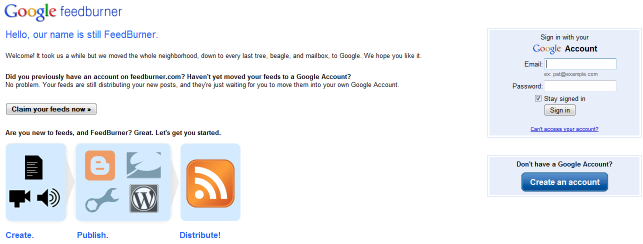
    You can go to http://feedburner.google.com to login, and you will see a page like this one.

    How do you find your FeedBurner address?

    This is actually pretty simple, but for the sake of the absolute beginner, you feedburner address is chosen by you when you burn your feed. It usually looks something like this: http://feeds.feedburner.com/myfeedaddress (where “myfeedaddress” is the unique feed string you’ve chosen).

    Where is my FeedBurner ID?

    This one is a little more tricky, but still pretty easy to discover. The first thing you want to do is go to the feedburner homepage and click “sign in”.

    Where is my FeedBurner RSS Title?

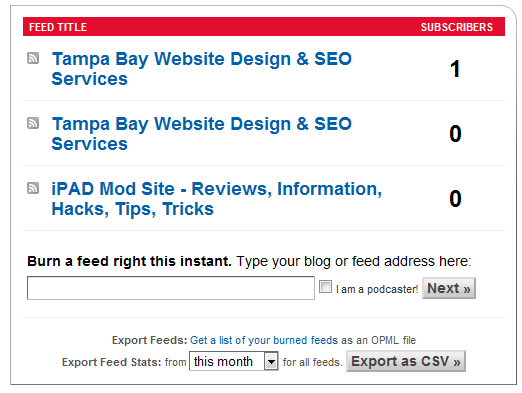
    This is a simple one, after you login to the page you will be presented with a page that looks like this:

    You can easily see your FeedBurner Title’s here. Although you rarely will need these, it is nice to at least know.

    If you want to know what a RSS feed looks like after you have applied Google FeedBurner to it, then check out my FeedBurner link.

    It is also nice to add FeedBurner icons to your page, that are clickable with your FeedBurner address on them.