Blog

  • HTML5 – Create Favicons Using Pure HTML

    HTML5 – Create Favicons Using Pure HTML

    At this point you should know what a Favicon is. It’s essential to creating your brand and creating brand recognition for your website.There is a great HTML5 tool which can help you get a Favicon on your website called Faviconist.


    Faviconist is for website designers and developers that want an easy and quick way to add beautiful favicons to a website without the need for a  Adobe Photoshop Tutorial or the like.  When designing and developing websites, an often overlooked feature is the favicon, not any more.

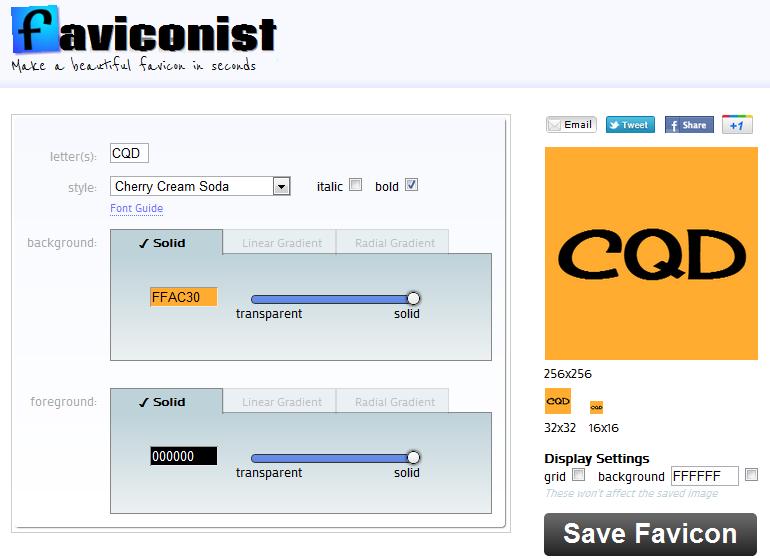
    When you first visit Faviconist to create a pure HTML5 Favicon, either for your own company or a web design client, the site presents itself as pretty straightforward. Just check out this screenshot:


    Faviconist -Easy HTML5 Favicons


    You can easily create a Favicon for your next web design project! It’s pretty much that simple!

  • Website Creation Secrets You Need To Know Today

    Most people don’t have the skill, time, or money to build a custom chopper or car. However with the proper tools, anyone can create a website quickly. Anyone can build their own website if they have the right tools and knowledge. The information below will give you some excellent advice about basic web design.

    Watch your color scheme on your site. If the text fades into the background due to poor contrast, the text will be hard to read. Choose a dark color for your text, and use a lighter color for your backgrounds. If you are not sure whether or not your chosen color scheme is user friendly, ask for some feedback from some of your friends.

    TIP! Keep finding fresh information all around you to boost your knowledge of web design. You can find more information online for free, too.

    In order for your site to bring in visitors, its navigation must be intuitive. Place your links so they can be found easily. A navigation menu will also help visitors locate exactly what they’re looking for. To help visitors find their way back, be sure to have a visible link to the main page on all your pages.

    Be mindful of your background. Certain sites contain GIF backgrounds that move, and although it may look nice, it can be harder to read the page’s content. Choose backgrounds that coordinate with your site, rather than clashing with it, and your message will be much more clear to your visitors.

    TIP! Be careful when introducing new colors into the design of your website. Your text should be easy to see against your background.

    Make sure your first page is simple. People judge a site and whether they want to go further by what the initial webpage looks like. Be descriptive when you talk about your business and what you offer that is unique, but keep other information minimal to avoid your visitors getting distracted.

    Make use of free software in your site setup. Oftentimes, people erroneously believe that shareware is inefficient for certain tasks. However, there are many free programs designed to help you keep your website neat and current. Just look around a bit to locate the ones that will work best for what you need.

    TIP! You should not go overboard using JavaScript. While it can provide a large variety of ways to build a more responsive and transparent website, it can cause problems for some of your visitors.

    Search Engines

    Frames are one feature to eliminate if you are attempting to optimize your site for search engines. While many people like frames, information tends to not be easily seen via search engines. If there is important information that you want the search engines to see on your website, never put it within a frame. This will lead to a reduction in visitors.

    TIP! There are numerous programs available for purchase to aid you in creating an attractive website. These are easy and will help you design a lovely site.

    Test your site as much as possible. While you’re designing the website,it is very important you perform the usability tests and website’s user interaction as soon as you can. Never stop testing and improving.

    A website counter is outdated and not attractive. It is not something visitors really want to see. Get rid of it and use other ways to see how many people have visited your site.

    TIP! Always keep your opening page simple. People judge you based on that front page.

    With these tips at your disposal, you can now get started with web page design. Playing around will help you learn the basics. Soon you’ll be ready to begin designing websites that people will love. Soon, you will become an old pro at website creation thanks to the information included in this article.

  • For Help With Designing Your Website, Read These Tips

    Designing sites online to promote a business is about the design. You don’t need to be an expert web designer to create a good looking site, all you need is good advice and tips on the things that work and don’t work. Read on for a ton of great tips.

    Incorporate a tagline prominently on your website. Using a tagline simply means that you will need to come up with a quick statement that lets visitors know what your site is all about. Making use of clear taglines becomes important when the page is visited. You have a short amount of time to catch the visitor’s attention and get them hooked.

    You will want to make sure you stay up-to-date with new information on website design found in various places around the Internet. You can just do a quick google search and find the information that you want to learn right on the web for free.

    TIP! Use fixed-position navigation. The panel maintains position while they view the page.

    A successful website needs to work for visitors using any browser, so it is important to test your web pages to make sure they display properly in different browsers. While a certain element may look wonderful in Firefox, it may appear incorrectly on Internet Explorer, Google Chrome or Safari. Therefore, check to see that all pages display correctly in all the large browsers prior to your site going live.

    Take some time to learn about shortcuts that can be used to save time. There are many shortcuts that can be used when designing your website. Learn as much as you can about shortcuts. Even HTML codes can be used to implement quick content updates.

    Avoid using pop-up advertising. Everyone hates getting pop-up after pop-up on a website. It does not matter who or what the website represents, most visitors will not hang around if they are bombarded with pop-ups. Stay away from those irritating ads and your visitors will be pleased. If the host you uses forces these pop-ups on you, you may want to consider looking for a new host.

    TIP! Don’t let content that is out of date linger on your website. For example, if your webpage is filled with advertising for something that happened months ago, viewers will turn away.

    Alt Tags

    Images need ALT tags so do this while you are setting up your website. These tags are important because they describe the images people see when they don’t have their graphics turned on or they’re for people that can’t see and need help with getting a website read to them. Even if you use links for your images, the ALT tags will help to explain what the link does. The last thing is that ALT tags attract search engine crawlers, so you can get a better ranking by using them.

    The tips you’ve just read will be useful when building your website. The use of the right techniques and information will amaze you. Use the information from this article to help you build a great website.

    TIP! Make it easy for visitors to back out of a process if they change their minds. This includes completing forms, enrolling in email newsletters and searching the site to find certain information.
  • Difficulty Understanding WordPress? Try Out These Tips!

    Knowledge is very crucial for WordPress. This holds true, even in terms of operating a blog or website. If you’re interested in making a website with WordPress, you’ve found a great article to help. Use these suggestions to begin. It pays to take a few notes as you read.

    Choose an interesting and unusual design for your WordPress blog. While it is tempting to save time, your viewers will not get the best impression. Create something that shows your unique flair.

    TIP! If your blog post includes a long title, adjust your permalink. For instance, “Ten Ways Smart Parents Can Tame Their Children” would come across as a cumbersome, long URL.

    WordPress is full of options, features and tools that you can use to improve your blogging site. For example, clicking the Kitchen Sink will give you choices such as importing and formatting posts. Use that to control all kinds of formatting elements.

    Make a schedule when you wish to start posting. You will increase your motivation if you know exactly how long it’s been since your last post. You might want to create posts up to a week ahead of time, then set the posts to upload on a schedule.

    TIP! Become familiar with the tools available to use with WordPress. For example, if there’s a Kitchen Sink button you click, you’ll be able to get a bunch of other choices that allow you to format and import what you want so posts can be unique.

    Your posts appear chronologically by default; however, you can change this. Changing the date is the first step to rearranging your list. In order to do that, open one of your posts and you will be able to see the date at the top right hand corner. Click the date and change it. Save your post and its order will change.

    Rank higher with the search engines by paying careful attention to the images that you upload. Add in the tags for the alternate text and titles. If someone decides to pin your image to Pinterest, your title is what will display on the screen.

    TIP! WordPress is great for adding video elements to blogs. It may take more effort, but it’s worth it.

    Ensure that it is possible for users to forward articles from your site to their email easily and at will. This is critical when it comes to sharing too, because those who do not have access to social media at work may still want to send your articles to their friends. You can do this by using a WP-Email plugin.

    Don’t choose a common term, such as “admin,” for your username. This will make your site vulnerable to bots that want to attack it. This is a risk to the security of your site. If you have usernames that are administrator or admin, delete them. Pick a different username.

    TIP! Make a posting schedule for yourself. A schedule helps you keep your eye on the deadline; so as the deadline approaches, it may give you more incentive to write that piece.

    Titles and targeted descriptions are important. These will be the first things your audience sees when discovering your blog via a search engine. Don’t overlook the importance of this fact. To get more control over such things on your own WordPress site, consider using Scribe software. This lets you edit pages to gain more readers.

    After reading this article, you know where to start with WordPress. Use these tips on your current WordPress site. You’ll immediately see the difference. Before long, your blog will start receiving more visitors. Work hard and those visitors will return again and again.

    TIP! Clean up the content and comments that do not add any value to your website. This will help ensure that your site remains user-friendly.
  • Improve Traffic, And Increase Revenue With These SEO Tips

    SEO is the act of adapting your website so that search engines rank it highly in their search results. SEO is a multimillion-dollar industry. Some people will say that SEO is too complicated for you to understand. Pay no attention to that.

    Meta Tags

    To improve your search engine rankings, don’t just add keywords to your site. Also add alternative forms of that keyword, including misspellings, in the meta tags of each page on your site. The content of your meta tags is what helps the search engine categorize your website and determine how to describe your link to searchers. For example, if the website is about rabbits, you could use rabbit, rabit, rabbits and rabbitt.

    TIP! When creating pages keeping SEO in mind, it’s better to have many short articles on related topics than one very long article. Having multiple small article helps boost your site better than one large one.

    Using keywords at a certain density is important when fitting your page to be optimized by search engines. No more than twenty percent of your content should consist in keywords.

    Find out how long they have been in business and how many clients they have served. Be aware of the risks that are involved, so you will be able to make an informed decision.

    Don’t use Flash on your website if you want it to be search engine friendly. Flash typically does not load very fast, and spiders are turned off by this. In order to optimize your website, the content must be able to be searched and indexed by search engines.

    TIP! Pick a domain name which has your desired keyword in it. Your website should be easy for visitors to find when they do a web search.

    Site Map

    A key to search engine optimization is to include a site map. Your site will be much easier for the spiders to crawl if you include a site map. A significantly large website might require more than one site map. Each map should not exceed 100 links in size.

    Blogging on your site will help improve your search engine ranking. The more visible your site is, the more traffic you will draw in.

    TIP! Most importantly, the site must entertain and grab the attention of visitors. This is crucial for a successful business online.

    Keep away from spam filters and never use duplicate content. You might not even realize that you are using the same material over and over. Having identical product descriptions on different pages may seem like an efficient thing to do, but search engines are unable to make the necessary distinctions.

    One of the latest ways of getting information out is through podcasts. Podcasts, in either a video or audio format, are a great way to communicate with your customers with relevant information. This content delivery method has really taken off among the general public, and all it takes to get in on this is a digital voice recorder or camcorder. Having descriptions for your podcasts helps search engines find them.

    While a lot of SEO is done by professional marketers, even beginners can get involved. Doing your own SEO is possible if you follow the suggestions previously given. Improved website traffic might be closer than you think!

    TIP! Header tags are quite important. Make use of your site’s CSS page to reduce the size to something appropriate.
  • Search Engine Optimization: To Be A Winner, You Need To Learn

    If no one visits your site, it will be a failure. The closer your site is to the very top of the search rankings, the more traffic you will draw. You have to know how search engines rank websites if you want good results. These tips will help you with SEO.

    Be patient for results from SEO. Significant changes and massive traffic will not come overnight. It can actually take a while if your site is brand new and not using a preexisting domain name. It takes as much time to increase the visibility of an online business as it takes for an offline business.

    Make it easier for the web spiders and your rank will increase. Spiders are constantly navigating your site’s content looking for relevant items like your keywords, but for them to do so, your site must be easily navigable. Create a site map to help the web spider to determine what is most important about your website and figure out the page hierarchy.

    TIP! There are many different techniques you can use to improve your search engine rankings. When the system is efficient, results will be more relevant.

    Anchor Text

    The correct anchor text is very important when linking internally on your website. Using generic anchor text like “click here” is a wasted opportunity to integrate more keywords. Good keywords in your anchors will get you noticed by the spider crawlers.

    Header tags are quite important. CSS can be used to reduce the size of the headers. Headers are essential because search engines enjoy using them to rank sites. Use the headers (H1 and H2) to emphasize important elements within your pages.

    TIP! Use many types of keywords and even common misspellings. The search engine spiders will “crawl” these tags and find your site relevant to the keywords, bumping up your site in the list of search results.

    Engaging meta description tags for each page on a website can be very useful when obtaining search engine optimization goals. These description tags are important, as they show up below the title of your page in search engine results. Describe your site and why people should click in as few words as possible using the meta tag. By doing this you will bring in a large audience, and you may even get more visitors than websites ranked higher than you on search engines.

    As you can now see, search engine optimization methods are essential for realizing success on the Web. Examine your website with these tips in mind and make the changes you need to. You will see increased traffic, greater visibility and higher profits.

  • Having A Hard Time Finding The Right Website Design Software? Try These Great Tips!

    There are many website creation companies in business today doing the same stuff that you can easily learn and do yourself at home. Be wary about all the web page design scams. The best way is to do it yourself. Start by reading these tips below to get a handle on design.

    Frames went out in the 90s, so do not rely on them. Frames used to be beneficial in some ways, but they always had their issues. Frame designs make the bookmarking difficult on your visitors, and it also makes scrolling a chore as well. There are a lot of better ways to get people to go through the website you have.

    Your visitors should be able to see your content regardless of the browser they are using. Test your pages with different browsers to make sure it is displayed properly. A webpage that displays properly using Internet Explorer, could appear incorrectly or poorly on a different browser such as Firefox or Chrome. Test how your pages display with all major browsers prior to launch.

    Make sure all links on your website are working properly before you publish your site. People will become frustrated if they a link leads them to a broken page. Use a program to scan your site to get the job done automatically.

    Stay away from using pop-up ads. There is not a person out there who will want to visit a website and get overwhelmed with pop-up ads. Most visitors to your website will not like pop-up ads, even on big sites, they are aggravating and cause people to leave. Avoid annoying your customers, by staying away from these irritating advertisements. If your web hosting company requires the use of pop-ups, consider moving to a new host.

    No matter who your target audience is or what your site is intended for, you should always aim to keep loading time to ten seconds or less. This will make people want to stay on your site. Most online users crave instant gratification, so your success relies on providing it.

    After you’ve learned more about website design, experiment and settle on something that works well. The tips you learned showed you how easy it can be. Simply review these tips and you will be on your way to a more creative design aesthetic.

  • Stellar Website Creation Tips To Put Into Practice Right Now

    When a designer has experience, the design of a website can be stunning. A good design can make the difference between a successful website and an unpopular one. To become a great designer, you must learn. Read the article below to expand your knowledge and build great sites.

    We are no longer in the 20th century, so try to avoid frames. Frames were in heavy use during the beginning days of the Internet, but they were very flawed. Visitors may find it difficult to scroll or bookmark your design when a frame design is present. It is simple to design your page so visitors can navigate through it.

    Your website needs to have easy navigation, if you want to have multiple visitors. It should always be easy to get from one page of the site to another. Menus render your website easier for users to surf. Make sure each page has a ‘home’ link.

    Minimize your web page’s size. Every Internet user does not have lighting fast speeds. If your site takes too long to load, you may lose visitors. If it takes too long many will just leave and visit a different website.

    Simplify your home page. Your front page can be the determining factor whether a visitor decides to stay or simply exits without seeing more. Use descriptions about your company and it’s goals.

    Regardless of how the design of your website is created aesthetically, be sure to make all of your files small. The sizes of the files affect the loading time of your site. Of course, having your website load quickly is the best scenario for visitors. You must also be aware that everyone doesn’t have a high speed connection to the Internet. Try to test your site regularly, especially with a slower dial-up modem. This will help you to know for sure that it will quickly load in every situation.

    Unique, interesting, and professional web design can really shape a website into something that is great. It’s easy to tell a bad design from a good one, and there are methods to help you design better sites. Putting these tips into practice will lead to effective website development.

  • Website Design Resource: css3files

    Website Design Resource: css3files

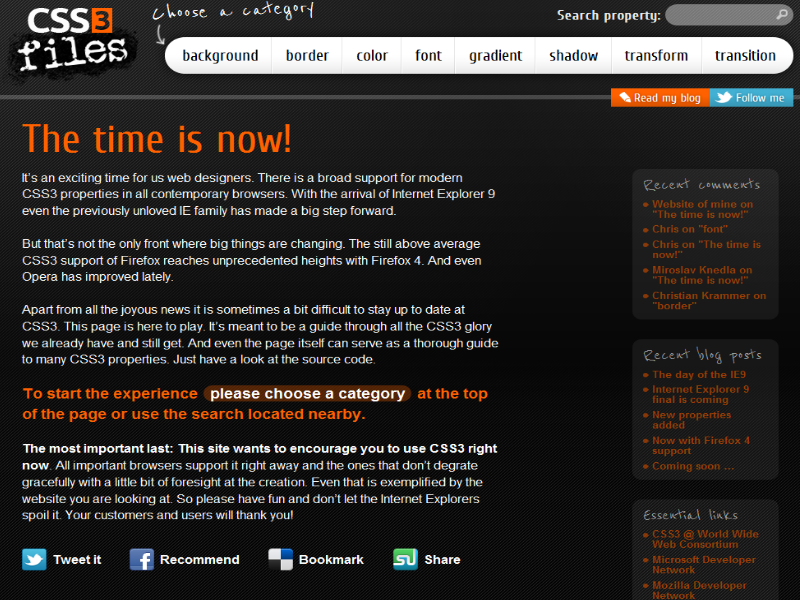
    If you are doing your own website design then you know how important CSS is.  Did you know that there is a new CSS version in the works? It’s called CSS3 and it’s totally changing the way we think about website design.  There are many websites out there that provide documentation, or resources, out there regarding CSS and all the neat tricks you can do with it. A new site, however, css3files guides users on css3.

    The website has interesting articles about backgrounds, border, color, font, gradient, shady, transform and transition.  CSS3 promises to bring website design to new heights.  There are even talks about it eliminating the need for Adobe Flash or Microsoft Silverlight.

    Anyway, back to css3files.  It has basically everything you need on one site.  These guys really know what they are talking about.  There is also a css3 files blog and their css3files twitter page.  Which I have already added them to my list of followers.

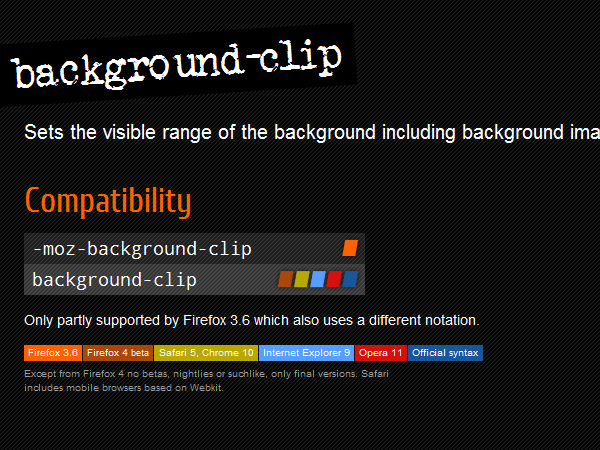
    On the css3files website, you click background.  Well it’s going to give you tips related to css3 backgrounds.  The part we like the most is that not only are they showing you how to code in css3, but they put on their which browsers currently support each css attribute.  It makes it easy to see what will work and what doesn’t work. Just like as shown in the picture below.

    Alright so check out css3files, its a great resource for CSS3 and it will definitely help you keep up with the times.  CSS3 is definitely not something that is going to go away any time soon.  Once it’s released, and everyone figures out how to update your Internet browser, we will be in good hands.

  • Late Night Search Engine Optimization (SEO) Tips

    Proper Things to do in Search Engine Optimization (SEO)

    • Keywords in URLFor example http://www.aboutdoghealth.org/ use whole words – keywords to best describe your site. Don’t rely on this if you don’t have keywords in other parts of your site.
    • Keywords in <title> tagThis shows search results as your page title, so this is one of the most important things and it shouldn’t be long 5-6 words max, and use keyword at the beginning.
    • Keywords in anchor textsAlso very important, especially for the anchor text, because if you have the keyword in the anchor text in a link from another site, this is regarded as getting a vote from this site not only about your site in general, but about the keyword in particular.
    • Keywords in headings (<H1>, <H2>, etc. tags)One more place where keywords count a lot. But beware that your page has actual text about the particular keyword.
    • Keywords in the beginning of a documentWhile coding your page put your main content before side bar. Because this also counts, though not as much as anchor text, title tag or headings
    • Keywords in <alt> tagsSpiders don’t read images but they do read their textual descriptions in the <alt> tag, so if you have images on your page, fill in the <alt> tag with some keywords about them.
    • Anchor text of inbound linksThis is one of the most important factors for good rankings. It is best if you have a keyword in the anchor text but even if you don’t, it is still OK.
    • Origin of inbound linksIt is important if the site that links to you is a reputable one or not. Generally sites with greater Google PR are considered reputable and the .edu and .gov sites are the most reputable
    • Links from similar sitesHaving links from similar sites is very, very useful. It indicates that the competition is voting for you and you are popular within your topical community.
    • MetatagsMetatags are becoming less and less important but if there are metatags that still matter, these are the <description> and <keywords> ones.
    • Unique contentHaving more content (relevant content, which is different from the content on other sites both in wording and topics) is a real boost for your site’s rankings.
    • Frequency of content changeFrequent changes are favored. It is great when you constantly add new content but it is not so great when you only make small updates to existing content.
    • Site AccessibilityAnother fundamental issue, which that is often neglected. If the site (or separate pages) is unaccessible because of broken links, 404 errors, password-protected areas and other similar reasons, then the site simply can’t be indexed.
    • SitemapIt is great to have a complete and up-to-date sitemap, spiders love it, no matter if it is a plain old HTML sitemap or the special Google sitemap format.

    Things not to do in Search Engine Optimization (SEO)

    • Keyword stuffingAny artificially inflated keyword density (10% and over) is keyword stuffing and you risk getting banned from search engines.
    • Keyword dilutionWhen you are optimizing for an excessive amount of keywords, especially unrelated ones, this will affect the performance of all your keywords and even the major ones will be lost (diluted) in the text.
    • Single pixel linkswhen you have a link that is a pixel or so wide it is invisible for humans, so nobody will click on it and it is obvious that this link is an attempt to manipulate search engines.
    • Illegal ContentUsing other people’s copyrighted content without their permission or using content that promotes legal violations can get you kicked out of search engines.
    • FlashSpiders don’t index the content of Flash movies, so if you use Flash on your site, don’t forget to give it an alternative textual description. And also don’t have just flash home page without HTML one.
    • FramesFrames are very bad for SEO. Avoid using them unless really necessary.
    • Redirects (301 and 302)
      When not applied properly, redirects can hurt a lot – the target page might not open, or worse – a redirect can be regarded as a black hat technique, when the visitor is immediately taken to a different page.
    • Bans in robots.txtIf indexing of a considerable portion of the site is banned, this is likely to affect the non banned part as well because spiders will come less frequently to a “noindex” site.
    • Session IDsThis is even worse than dynamic URLs. Don’t use session IDs for information that you’d like to be indexed by spiders.
    • Cross-linkingCrosslinking occurs when site A links to site B, site B links to site C and site C links back to site A
    • Duplicate contentWhen you have the same content on several pages on the site, this will not make your site look larger because the duplicate content penalty kicks in. To a lesser degree duplicate content applies to pages that reside on other sites but obviously these cases are not always banned
    • Doorway pagesCreating pages that aim to trick spiders that your site is a highly-relevant one when it is not, is another way to get the kick from search engines.
    • CloakingCloaking is another illegal technique, which partially involves content separation because spiders see one page (highly-optimized, of course), and everybody else is presented with another version of the same page.
    • Invisible text
      This is a black hat SEO practice and when spiders discover that you have text specially for them but not for humans, don’t be surprised by the penalty.